
What needs to be automated in office “paperwork”? Sending emails to clients, consolidating data into spreadsheets, preparing reports, reminding colleagues. These tasks reduce overall efficiency and distract from truly important work.
These processes are cyclical: sales reports every week, distributing requests every morning, client reminders every evening. As a result, employees spend time on routine tasks instead of analysis and project development.
Automation removes the burden: algorithms perform repetitive actions, while employees focus on tasks that require creativity and strategy.
What is n8n and how does it work?
n8n is an open-source platform for process automation. It works like a constructor: action and service blocks are connected in a chain to form a ready-made script.
The principle is simple:
- select services to connect;
- set interaction conditions;
- launch the process.
Example: request in Google Forms → entry in Google Sheets → notification in Telegram → task in Jira.
n8n supports over 400 applications (Google Workspace, Slack, Telegram, WhatsApp, CRM, databases). If needed, you can connect any API or write a handler in JavaScript.
The platform can be deployed locally, on a server, or in the cloud (n8n.cloud). Processes can be launched on schedule, by event, or manually.
What else can you get from n8n besides time savings?
- Error reduction. The system works according to set rules and eliminates the human factor.
- Transparency. Every action is recorded, making it easier to control the process.
- Flexibility. Automation scales with the business.
- Easy to onboard colleagues — the script replaces instructions.
- Business processes are optimized. The process of creating a script forces you to reconsider previous procedures.
Practical examples of automation with n8n
- Notifications. A new request immediately goes to the CRM, the manager receives a message, the client gets confirmation.
- Data collection. Sales, statistics, and expenses are automatically consolidated into Google Sheets.
- Social media. One post is automatically published across different social networks and messengers, taking into account their formats and formatting requirements.
- Monitoring. Tracking brand mentions, website status, and competitor activity with instant notifications.
Thus, n8n puts routine on “autopilot” while employees focus on business development and client work.
Case Study: Daily Report to Telegram
Let’s try to analyze a fairly simple automation example that can be launched quickly.
Problem:
In the company, every Monday the department head spends time compiling a report on inbound and outbound line work for the previous week. They need to log into the Oki-Toki cloud call center, select filters, export data, format it nicely, and send it to management.
Solution with n8n:
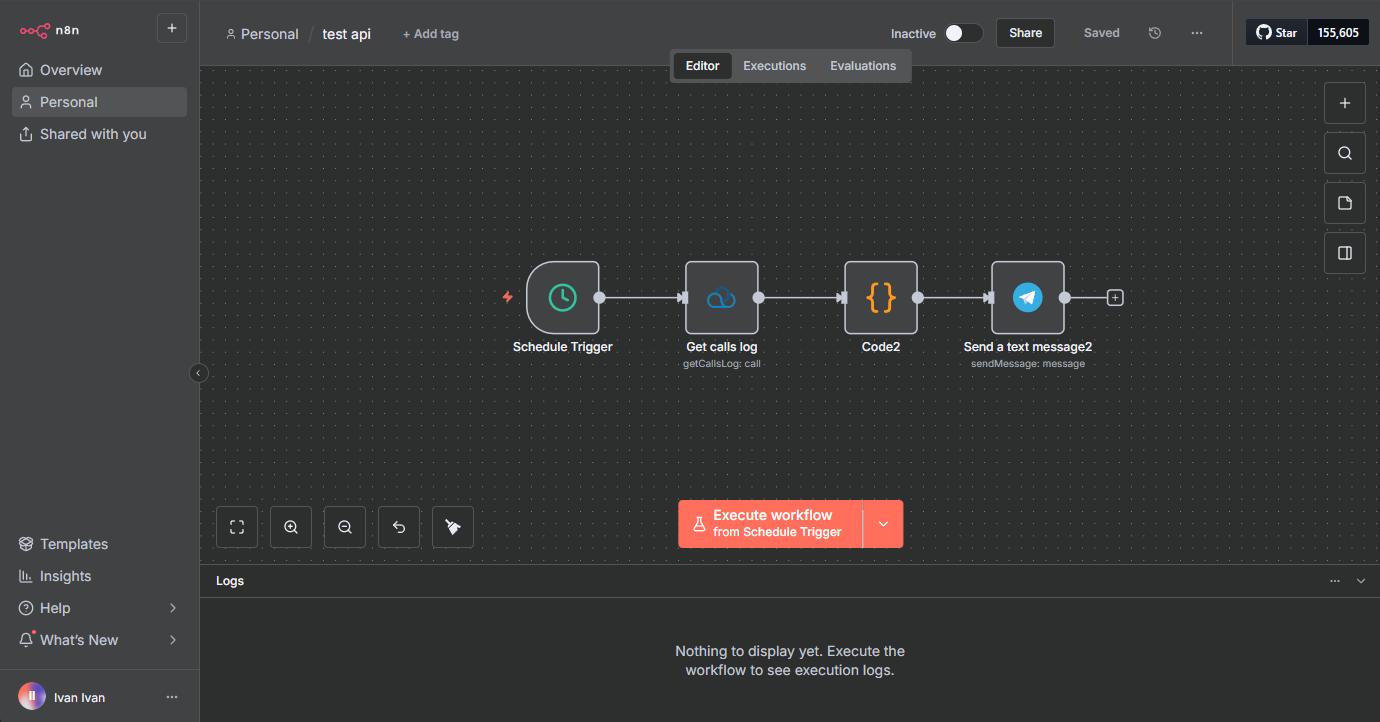
This is approximately what our workflow will look like, and we’ll also see the interface:
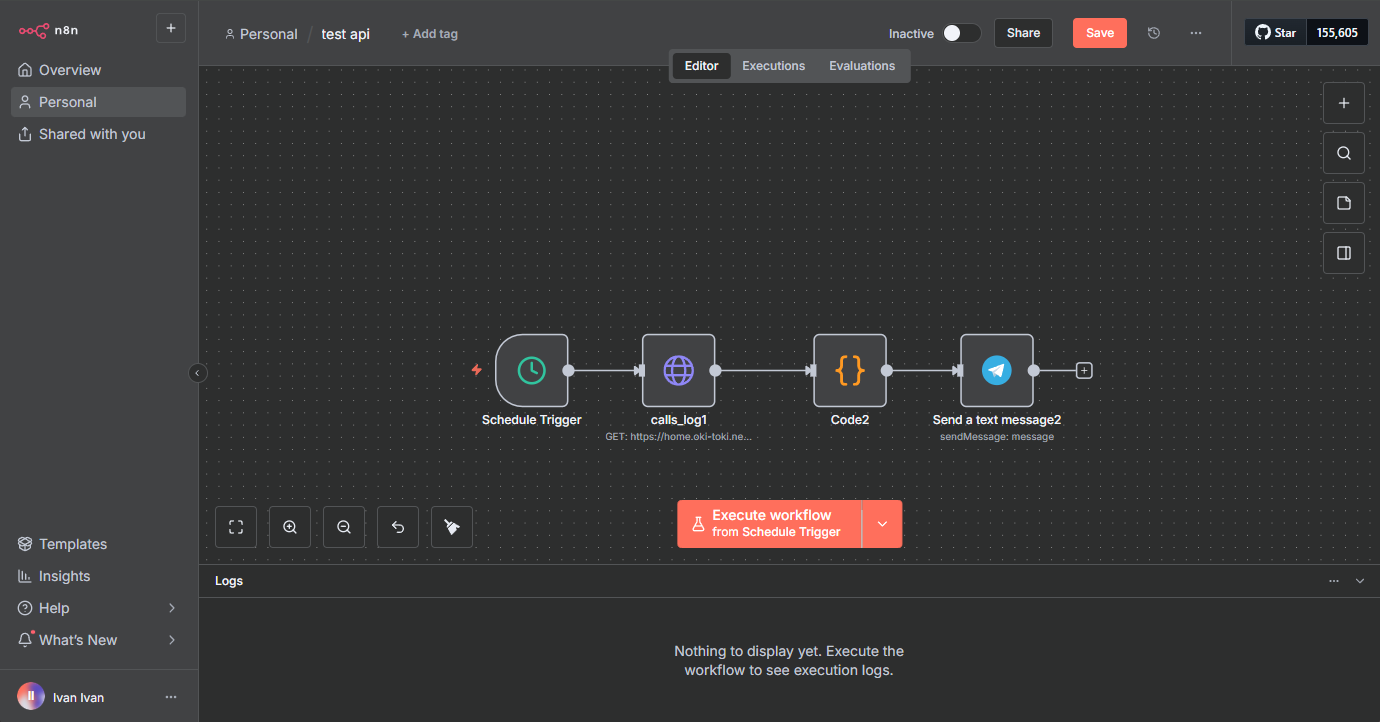
Schedule Trigger node:
This is a node in n8n that automatically launches a workflow at a specified time or with the required frequency, in our case — 9 AM every Monday.
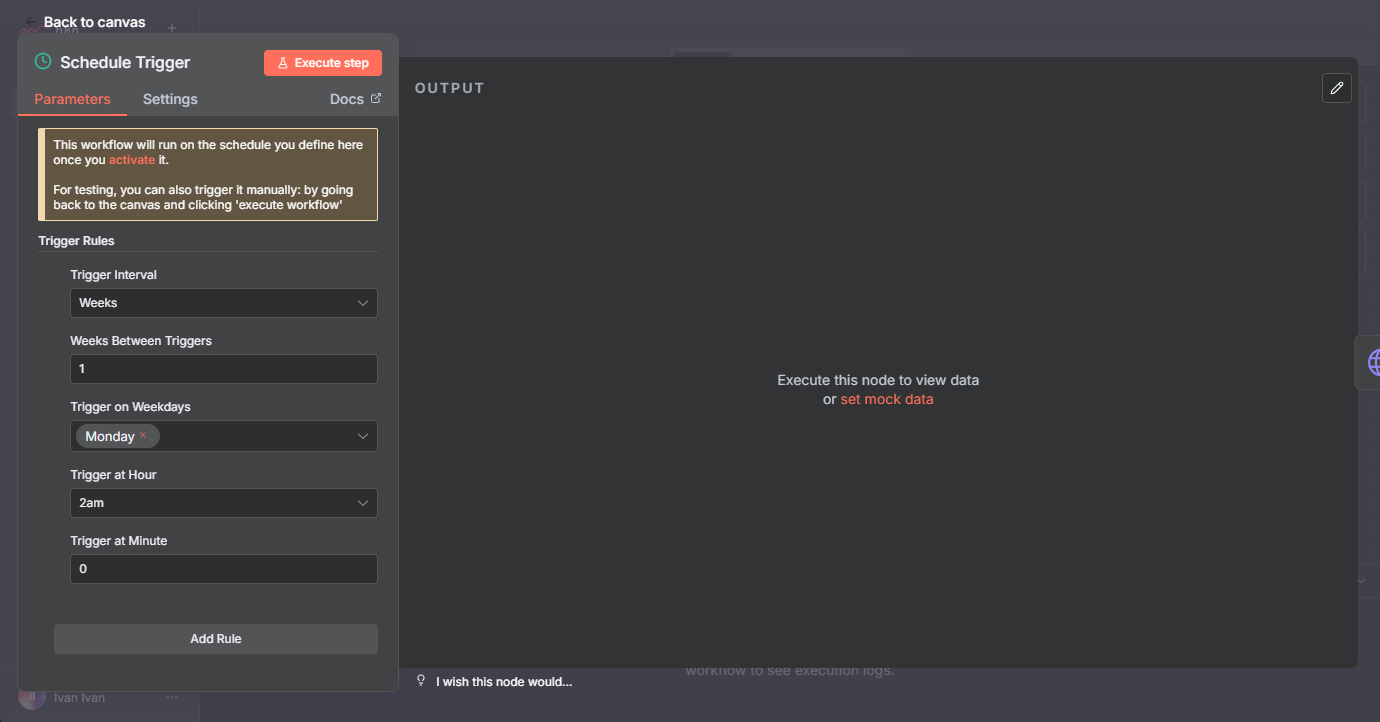
Since the server’s time zone is set to New York, the schedule needs to be shifted by −7 hours relative to UTC+3 — the start will be every Monday at 9 AM.
HTTP Request node:
Queries the Oki-Toki API and retrieves data for the previous week.
In addition to the standard approach, we’ve prepared an alternative solution.
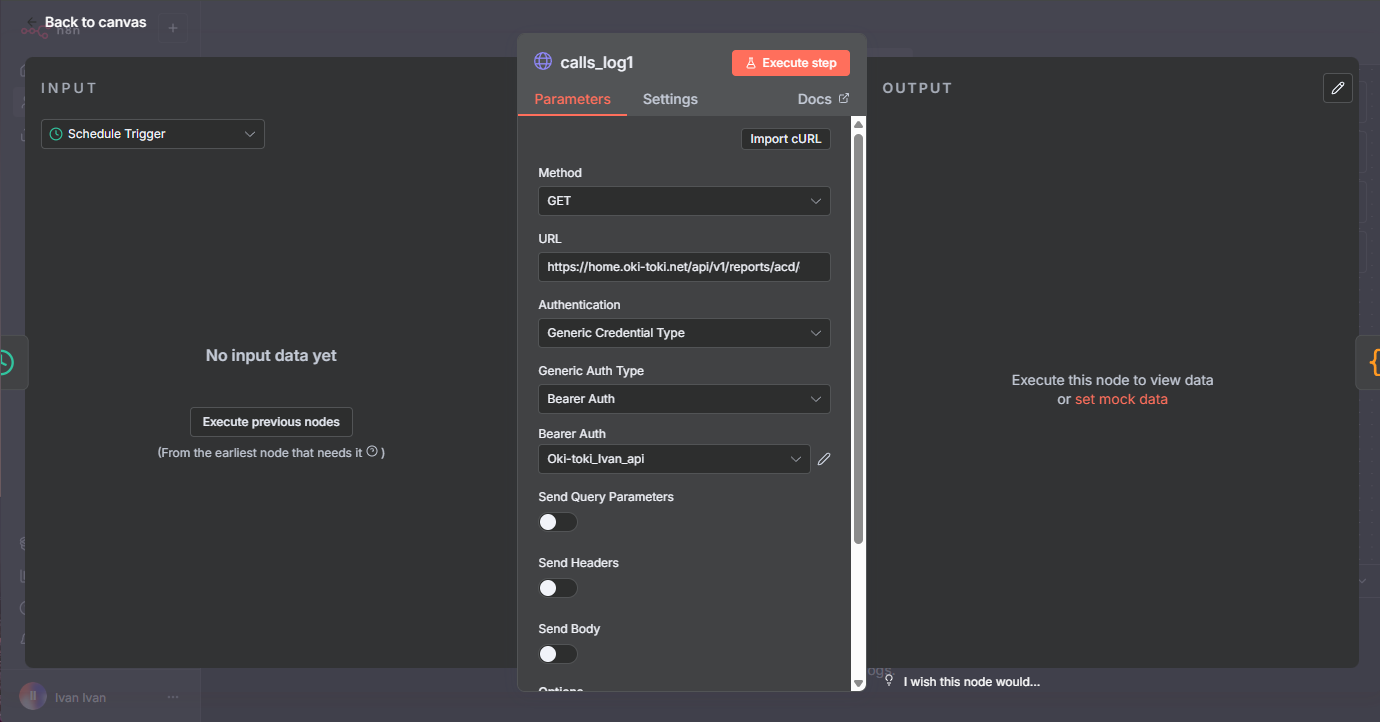
This will be more interesting. Let’s configure the fields:
Method: GET (since we need to retrieve information).
URL: create a link for the API request to Oki-Toki. More about the documentation can be read in a separate blog article.
We’re interested in a report on inbound and outbound lines where an agent participated. Therefore, the link will look like – https://home.oki-toki.net/api/v1/reports/acd/calls-log?date_range=prev_week&search=func&call_type[0]=I&call_type[1]=O&fname[0]=operator.
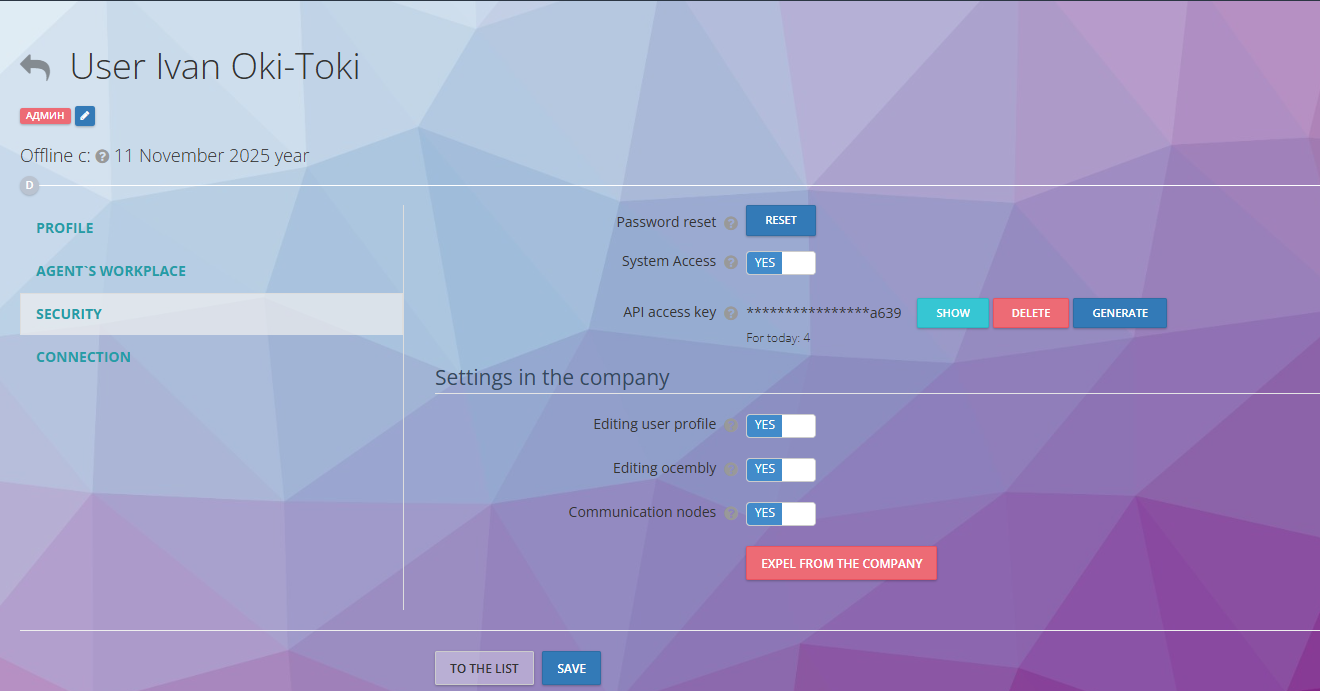
Authentication: Bearer Auth. And create our connection.
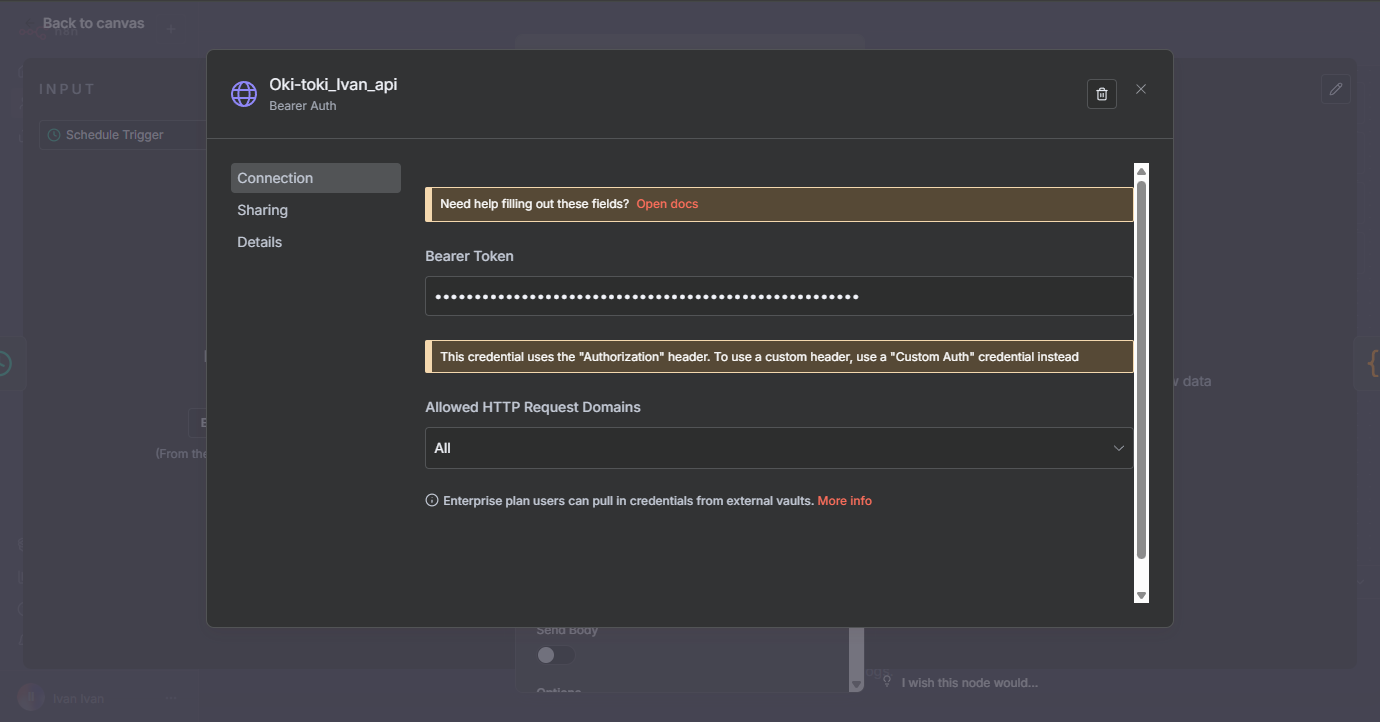
We can find the API access key in user settings.
Killer feature:
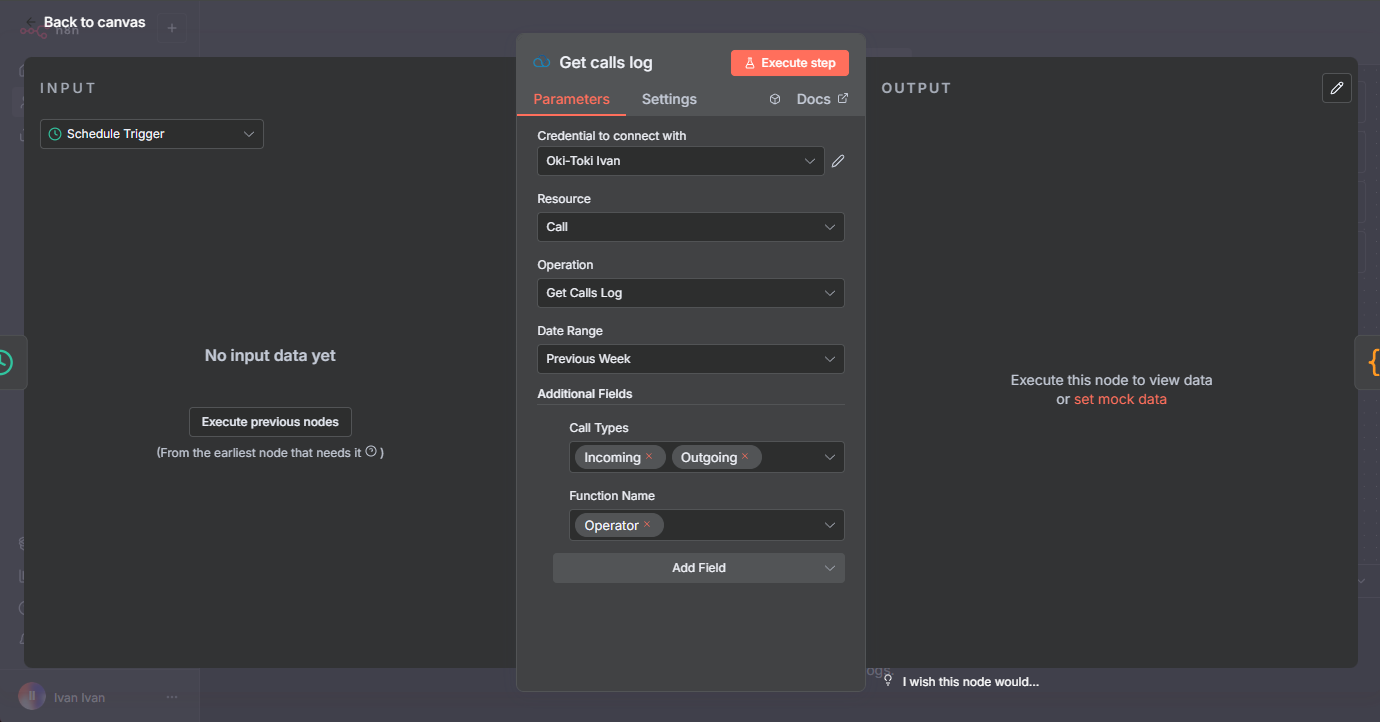
Can’t configure the HTTP Request? We have a great solution — a ready-made community node for Oki-Toki in n8n!
Our team has developed a special node that significantly simplifies integration with the Oki-Toki API. Instead of manually configuring HTTP requests, specifying parameters, and parsing responses, you get a simple interface to the API.
What this provides:
- Ease of use — no need to understand API request structure. All methods are available through a convenient visual interface.
- Rich functionality — the node includes most popular functions from the Oki-Toki API: getting reports, working with calls, dialers.
- Time savings — setup takes minutes instead of hours. Simply specify the API token once, and all functions become available.
- Fewer errors — the node automatically forms correct requests, eliminating typos in URLs and parameters.
How to get started:
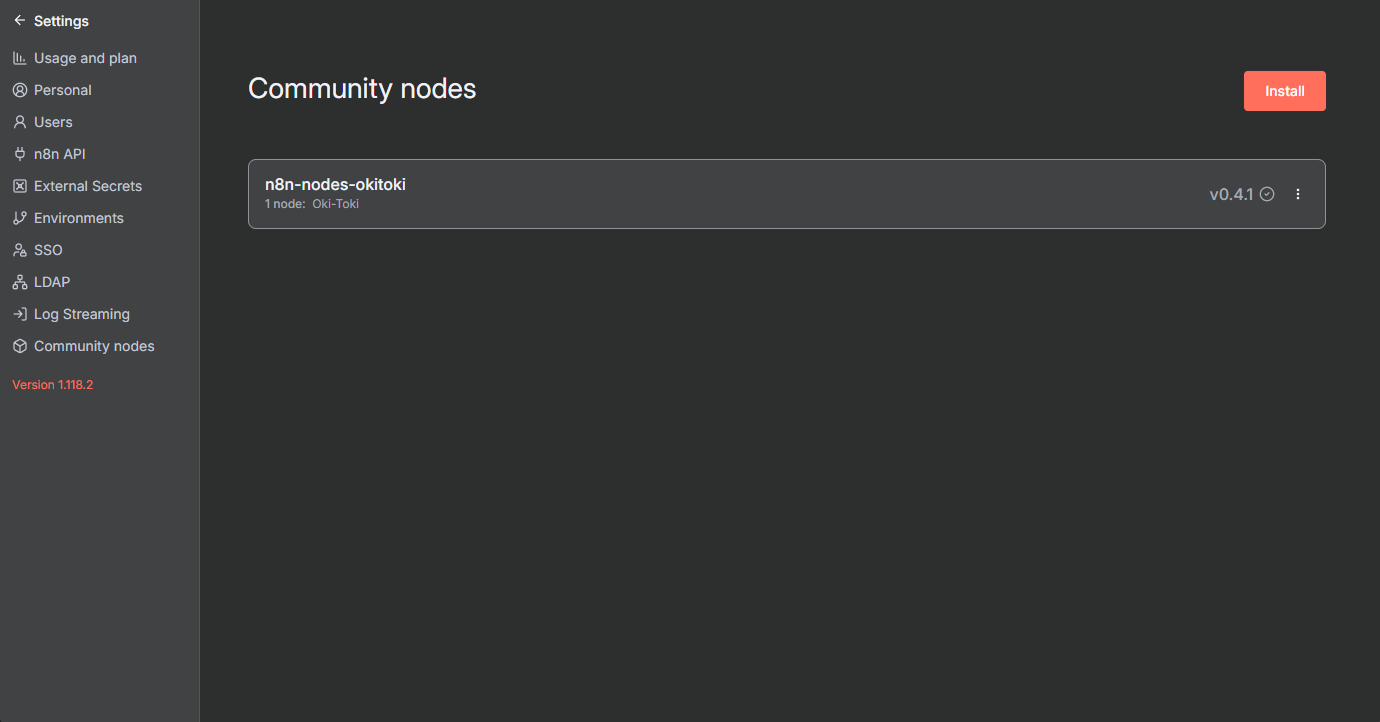
- Install the node from Community Nodes in n8n settings using the command npm install n8n-nodes-okitoki;
- Add the Oki-Toki node to your workflow;
- Create a connection by specifying your API token;
- Select the required function from the list — “Get Call Log”;
- Configure parameters through simple fields (period, call type, etc.).
Code node:
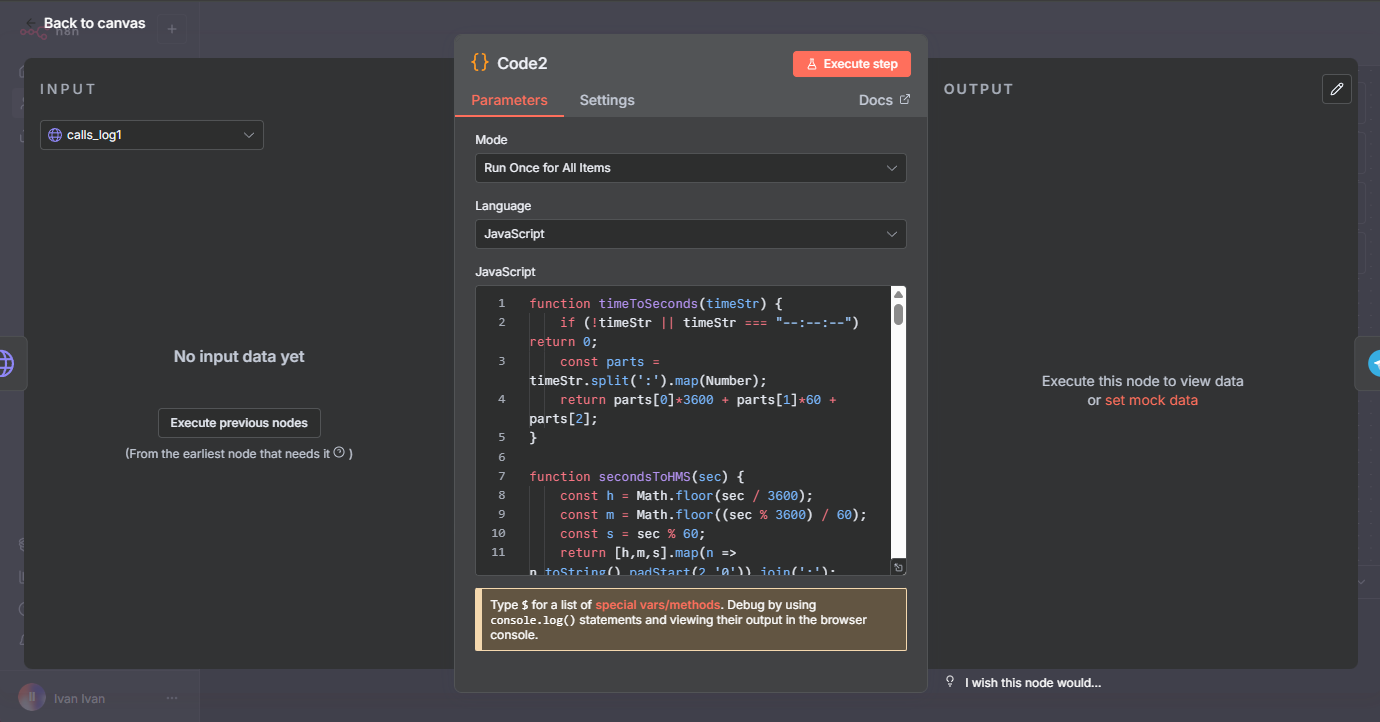
Processes the received data: counts total number of calls, talk time and wait time per agent, top and bottom agents.
We proceed to the most complex part — creating code that will give us the necessary data. In this case, we go to AI and ask it to write code for data transformation :).
My prompt looked like this:
“I need code for n8n to generate call statistics and send them to Telegram.
I have call data in JSON format: each call has call_type (IN/OUT), status, operator, atime (wait time), and ctime (talk time).
What’s required:
1. Calculate overall statistics:
- Total calls.
- How many successful and unsuccessful (with percentages).
2. Split statistics by outbound and inbound calls. For each agent show:
- Number of calls.
- How many successful and unsuccessful (with percentages).
- Total wait time and talk time.
3. At the end, add an overall “Top/Bottom” section for all calls combined (without dividing into IN/OUT):
- Leader in successful calls (in %).
- Bottom in successful calls (in %).
- Leader in average talk time.
- Bottom in average talk time.
Output should be formatted text that can be sent directly to Telegram”.
Telegram node:
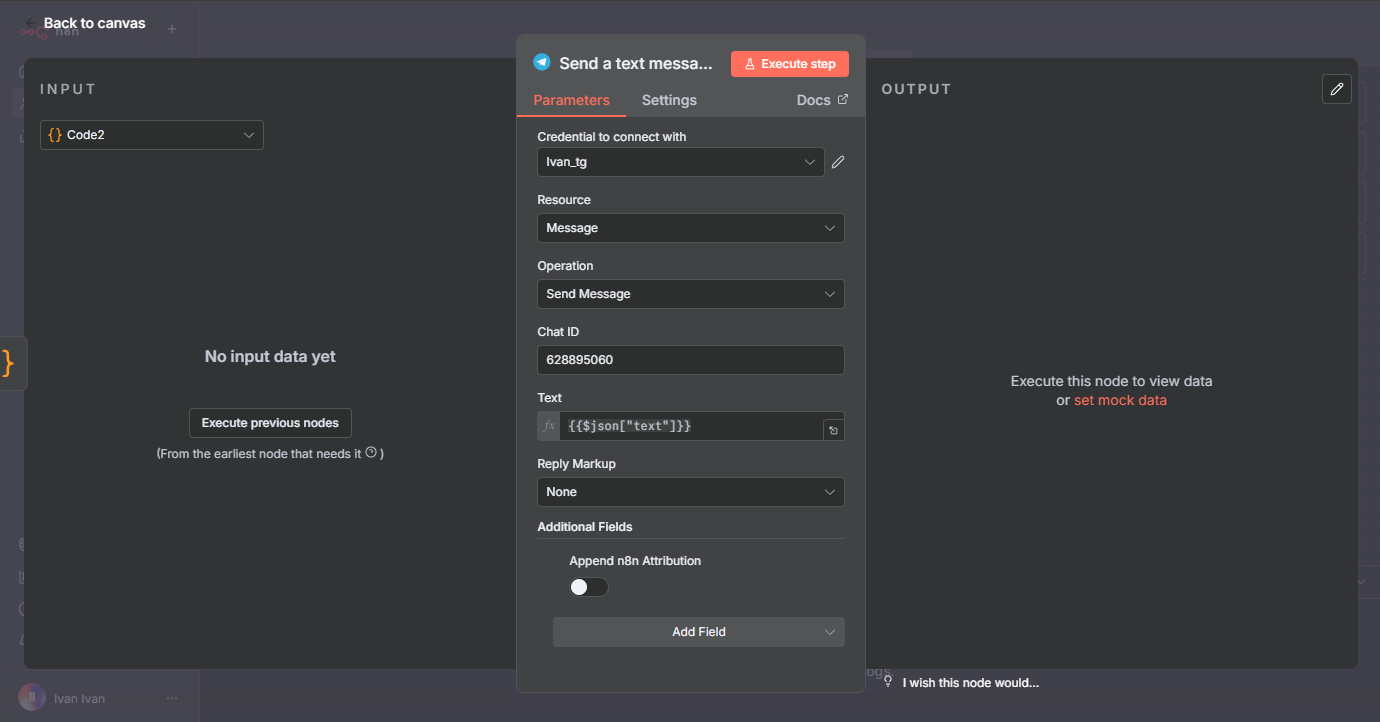
Formats a nice message and sends it to the management chat.
Let’s break it down step by step:
Step 1: Create a bot in Telegram.
- In Telegram, find @BotFather (official bot).
- /newbot → set name → set username (must end with bot).
- After creation, BotFather will give an Access Token like 123456789:AAABBBccc…. Write it down — it will be used in n8n.
Step 2: Add Credentials in n8n.
- In the n8n interface → go to the Credentials section.
- Add a new credential: select Telegram API type.
- Paste the token received from BotFather. Name it something clear, for example Telegram Bot for notifications.
Step 3: Find out Chat ID.
For the bot to send private messages or to a group chat, you need to know the Chat ID:
- If it’s private messages (i.e., bot and a specific user), the user must initiate a dialog with the bot (write anything).
- Find the @userinfobot bot in Telegram.
- Press Start.
- It will immediately show your user_id (this is the chat ID).
Setting up such a workflow takes about an hour. After that, the report will arrive automatically every Monday. The message in Telegram looks clear:
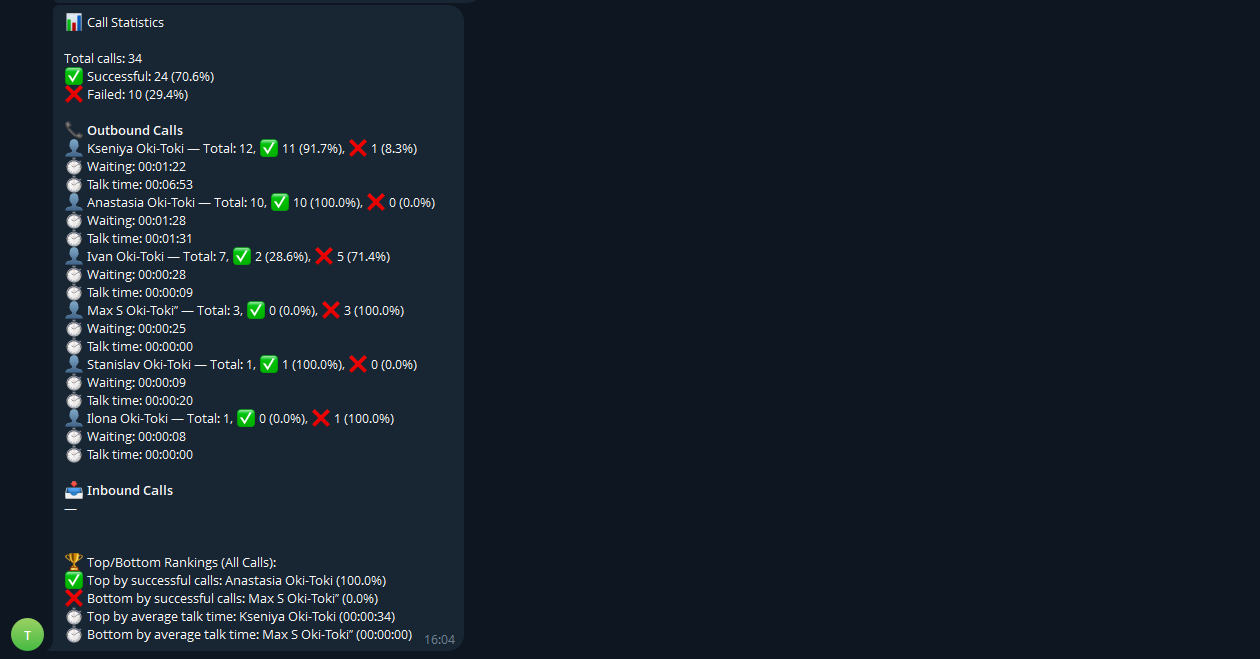
The appearance of the content can always be adjusted. Management receives information on time, data is always current and accurate, and the call center manager has extra time every morning to solve more important tasks.
Practical implementation tips
- Start small. The most common mistake is trying to automate everything at once. It’s better to choose one frequently repeated process: notifications, collecting requests into a spreadsheet, weekly reports. The n8n website has ready-made workflows that are easy to adapt to your tasks.
- Use built-in capabilities. n8n has hundreds of integrations with popular services — Google Sheets, Telegram, CRM, databases. For most scripts, no code is needed: just connect an account and configure parameters.
- Increase complexity gradually. Start with simple notifications, then add conditions: large orders — to management, VIP clients — priority. This way, a simple scheme becomes a full-fledged system.
- Automate frequent processes. The greatest effect comes from tasks performed dozens of times a day. Make a list of repetitive operations and choose three key ones — results will be noticeable immediately.
- Entry barrier. Being a programmer is not required. Understanding process logic is enough. Video tutorials, documentation, and the community help at the start. Practice quickly fills the gaps.
Conclusion
n8n is a working tool that speeds up processes, although it requires gradual implementation — process by process needs to be transferred and debugged for automatic processes. Each automated script saves time and reduces errors.
Starting with one process is worthwhile — a report, newsletter, or notification. The first result motivates the team and generates new ideas for automation. Even small scripts provide significant effect: dozens of hours per year and resource savings.
The platform scales with the business: from personal tasks to automating departments and the entire company. The main thing is to take the first step. Install n8n, build a simple workflow, and try it on your tasks. To start, you can create a consultant bot, then make a decision approval procedure through your Telegram, then try to create a specialist bot (secretary, marketing analyst, accounting assistant, etc.) that will participate with you in internal groups. Discuss your desires with a neural network and form a roadmap that suits you.