
Surveys play an important role in research, helping us understand people’s opinions and preferences. The term “CATI” is short for “Computer-Assisted Telephone Interviewing,” or computer-assisted telephone interviewing. “CATI” is a way of using technology to conduct surveys over the phone. In this article, we’ll look at the role of surveys in research and introduce the term “CATI” and how it is used in survey work.
Using CATI Surveys in Different Fields:
CATI surveys are used in different areas to collect valuable information and understand various aspects of society and business. Let’s look at a few examples of how CATI surveys are used:
- Marketing research and consumer behavior studies: CATI surveys in marketing help study the market, identify customer preferences and needs, evaluate the effectiveness of marketing campaigns, and develop strategies for promoting goods and services.
- Sociological research and public opinion polling: in sociology, surveys help study social phenomena, public sentiment and perceptions, assess the level of trust in politicians and institutions, and conduct research on social and economic issues.
- Medical research and patient satisfaction assessment: CATI surveys are used to collect data on health and medical care. They make it possible to assess patient satisfaction, identify issues in medical practice, and gather information to improve the quality of healthcare services.
- Research in education and student surveys: surveys are used to study educational needs, assess the quality of education, collect student feedback, and analyze the effectiveness of academic programs.
Using CATI surveys in these areas makes it possible to obtain important information for decision-making, service improvement, and better performance. Thanks to the flexibility and convenience of CATI surveys, researchers can conduct surveys with ease and get valuable data for their projects.
Survey questionnaire templates
A CATI survey questionnaire template is a useful tool that helps collect valuable information from respondents. Using a template makes the survey process simpler and more efficient. Instead of creating each question from scratch, you can use ready-made questions and adapt them to your needs. This allows you to focus on analyzing results and making important decisions rather than spending time writing questions.
Client service quality callback script
Calling customers is an effective way to gather feedback and learn how a company can improve its service. A ready-made script will help you conduct the survey and get valuable data from customers.
Sample customer service quality questionnaire:
“Hello! I represent Ocean and would like to ask you a few questions about the quality of our service. Your opinion is very important to us!”
“How would you rate the quality of our service on a scale from 1 to 10?”
“Please tell us what you liked about our service and what could be improved?”
“Are there any specific points you would like to highlight — good or bad?”
“Would you recommend our company to someone you know? Why?”
“Thank you for your time and feedback! If you have any other comments or questions, please let us know.”
You can also find questionnaire templates for agents in the article Ready-made scripts for the call center.
Questionnaire for an IT customer
With a questionnaire on IT service quality, you can collect valuable information from customers and improve service quality. An IT service questionnaire will help gather feedback and understand which aspects of the work need improvement.
Example of a questionnaire for surveying IT service usage:
“Good afternoon! We are conducting a survey about your experience using IT services and would like to hear your opinion. Please answer the following questions.”
“How often do you use IT services (for example, computer software, cloud services, etc.)?”
- Every day
- Several times a week
- Once a week
- Less than once a week
- Rarely or never
“How would you rate the quality of the IT services you use on a scale from 1 to 10 (where 1 is very low quality and 10 is very high quality)?”
“What are the main benefits you see in using IT services?”
- Increased productivity
- Improved communication and collaboration
- Better data security
- Convenience and accessibility
- Other (please specify)
“What problems or drawbacks have you encountered when using IT services?”
- Unclear interface or difficult to use
- Insufficient reliability or frequent outages
- Poor support or slow response to issues
- High cost
- Other (please specify)
“If you could change or improve something about IT services, what would it be?”
“How would you describe our company and our IT services overall?”
“Thank you for taking part in the survey! If you have any other comments or suggestions, please write them below.”
It is also worth noting that there is no universal script for conducting CATI research. In any case, you will need to adapt the template to suit your own needs.
Create a script in Google Docs or Microsoft Word and import the questionnaire into Oki-Toki.
CRM questionnaire in Oki-Toki
In Oki-Toki, you can create a structured and consistent set of questions for conducting surveys and collecting information from respondents. With a dialog script, you can easily organize and manage the survey process, ensuring the accuracy of the data you collect.
The main advantages and features of the survey script in Oki-Toki:
- Flexibility and customization: You can create your own surveys tailored to the specific needs of your business. In the questionnaire, you can choose question types, add answer logic, and customize the sequence of questions to get the most useful information.
- Ease of use: The Oki-Toki interface makes it simple and intuitive to create and edit survey scripts. You can easily add, change, or delete questions, as well as configure different survey settings.
- Control and analysis of results: Oki-Toki CRM allows you to track survey progress and monitor the quality of the data collected. You can access survey results and analyze them using built-in tools and reporting.
- Integration with other services: Oki-Toki virtual call center has the ability to integrate with other services, CRMs, and platforms, making it easy to use survey results later on.
- Automation and process optimization: Oki-Toki lets you automate surveys by setting parameters such as survey duration, number of respondents (quotas), and the research schedule.
Quotas are a tool for planning and collecting the required number of respondents who match the set criteria. Quotas help monitor research effectiveness and determine whether goals have been reached. Quotas are widely used in CATI research, sales, and more.
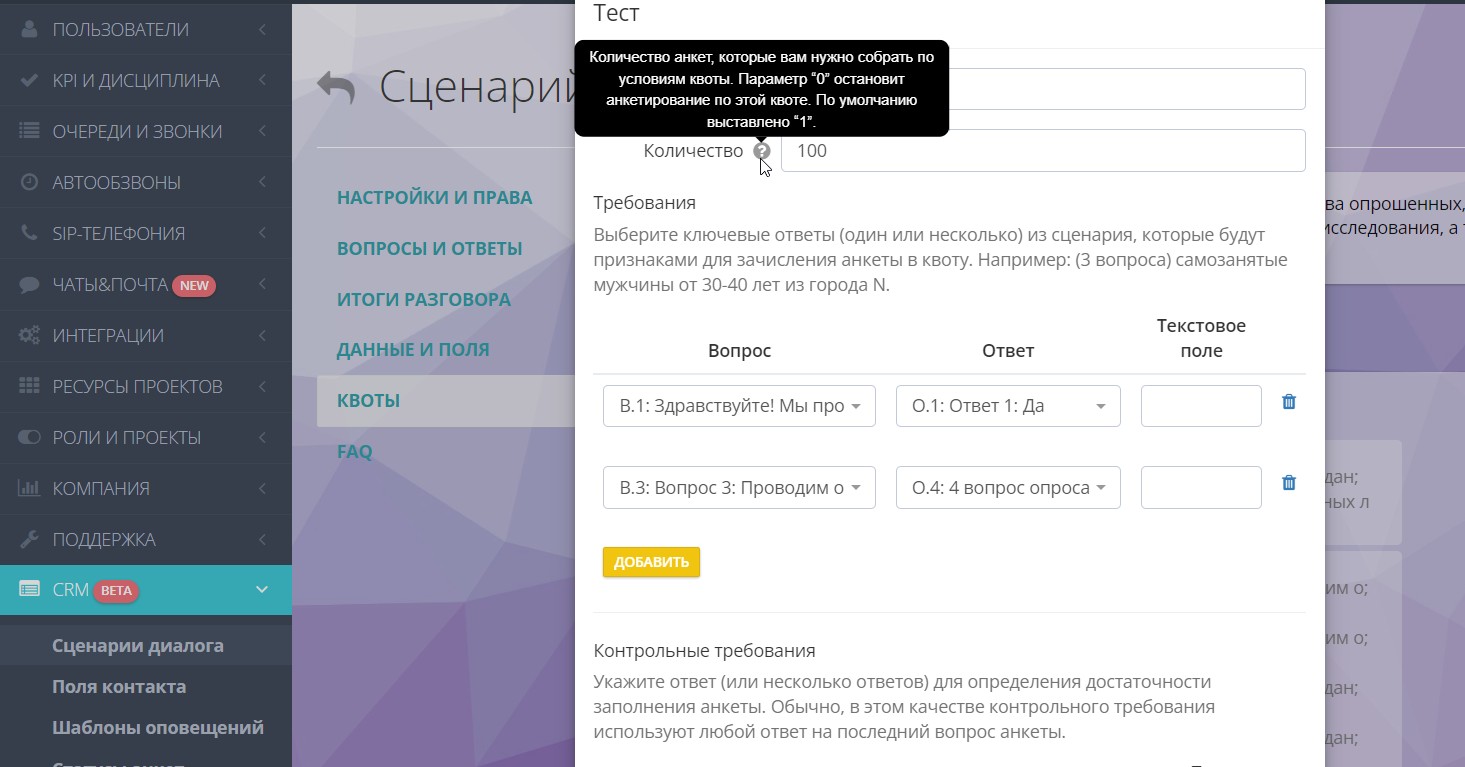
The CRM questionnaire in Oki-Toki is a convenient tool for conducting surveys and getting valuable information from your target audience. It helps you better understand the preferences, opinions, and needs of customers or your target group, and make more informed and effective decisions based on the data you collect.
Thanks to its ease of use and customization, the survey script in Oki-Toki becomes an indispensable tool for various marketing studies, consumer behavior research, service quality assessment, public opinion polling, and many other areas.
Useful CRM features in Oki-Toki
|
- Unique numbers: Oki-Toki has a duplicate-control system that lets you update and refresh your database. This helps keep your customer database up to date and avoid duplicates, which improves the quality of CATI research.
- Call recording: This option lets you monitor agent performance, review customer conversations, and identify mistakes. Call recordings are saved automatically and can be listened to at any time.
- Speech analytics: An Oki-Toki tool that adds tags to transcripts for a supervisor or QA. Speech analytics tracks interruptions of the customer, pauses in the conversation on the agent’s side, profanity, and more.
If you’re visiting our site for the first time, check out a series of short videos about Oki-Toki scripts.
You can register here and explore ready-made script templates.