- What is a SIP response
- What happens to your call at each stage
- SIP response groups in Oki-Toki
- Why codes may differ between providers
- How to analyze SIP codes in Oki-Toki
- Why you need to understand SIP codes in 2026
When working with IP telephony, cloud PBX systems, and Oki-Toki in particular, you will inevitably hear or see something like: “We see 404 from your side” or “We’re getting SIP 100 and that’s it.”
For some, these are just numbers; for others, they’re direct signals showing where to look for the problem. SIP 404 may mean the number wasn’t found or the destination doesn’t exist. SIP 100 means the request was accepted, but then the chain breaks. Sometimes behind these three digits lies incorrect routing, channel limitations, or an authorization error.
SIP codes are not “scary tech stuff” but hints. They show at which stage the call got stuck: whether it went to the operator, reached the subscriber, was rejected by the server, or exceeded the channel limit. If you understand what’s behind these responses, conversations with your provider or technical support become shorter and more productive.
Let’s figure out what a SIP response is and how to properly interpret the information received.
What is a SIP response
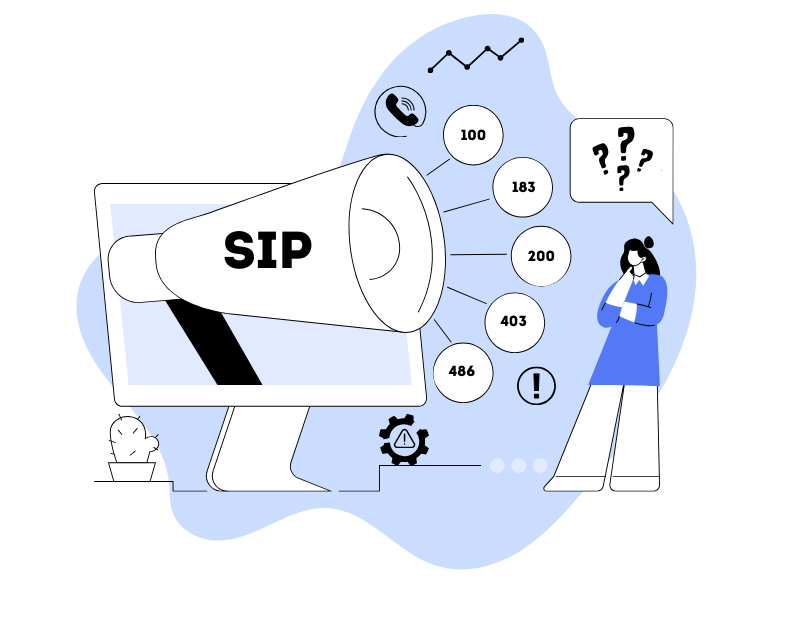
SIP (Session Initiation Protocol) is a protocol for establishing voice sessions over the internet. When you initiate a call through a SIP client or SIP trunk, the provider’s server responds with a special code. This code is the SIP response.
It consists of:
- a three-digit number (for example, 500),
- a short text description (OK, Busy, Forbidden, etc.).
Example: SIP 200 OK — connection established.
What happens to your call at each stage
What you see as an error is the last SIP response that comes from the provider when call processing is completed.
Conventionally, the call process can be divided into several stages:
- We send a call request to the SIP provider — the so-called INVITE.
- We receive a response from the server — most often it’s 100 Trying (request accepted and being processed).
- Then the provider may send intermediate responses: 180 or 183.
Most often, if something is wrong and there’s a connection error (403, 404, 503, 487, etc.), it will be the last response.
- If the client picks up the phone, their last response will be SIP 200. In case of successful connection, the SIP provider informs us that the subscriber has answered (in telephony this is called “connect”).
- When ending the conversation, the initiator sends a “BYE” command. The recipient responds with code 200 OK, confirming the session termination.
SIP responses during calls are not messages (or errors) from Oki-Toki, but the last responses from the SIP provider, and only they can name their exact cause.
SIP response groups in Oki-Toki
You can read about all SIP responses here, and below we’ll cover the most common codes. They are divided into several classes — by the first digit.
1xx — informational
The most common are SIP 180/183 No answer — no answer. This means the called party did not answer during the call time.
SIP 100 No answer — our system did not receive a response from the telephony provider within 10 seconds.
It’s worth noting separately the situation when a call in Oki-Toki ends in failure with SIP 100. Any IP phone, PBX, and SIP provider has its own limitation on call processing duration. If the SIP provider, after accepting the call for processing, doesn’t report anything about the call processing progress, the call is forcibly terminated (in our case, after 10 seconds). In a normal working situation, 0.1-3 seconds pass from SIP 100 to the next response. This is the practical norm. If 10 seconds pass — this is already a reason to investigate together with the provider.
2xx — success
Everything is simple here: the operation was successful.
SIP 200 OK — connection established, subscriber answered.
Important: SIP 200 is not a guarantee of audio quality. If there are audio problems after code 200 — the cause should be sought in the network or media stream.
4xx — client error
This is the most common category in logs. Usually means the server is rejecting the request due to problems in call parameters, settings, or permissions.
The most popular:
SIP 403 Forbidden — call is impossible. Probably, though not necessarily, the carrier has blocked outgoing calls from your number.
Reasons can vary:
- IP not in ACL;
- destination is blocked;
- number not authorized for transmission (Caller ID not confirmed);
- SIP profile registration is absent;
- outgoing authorization is disabled;
- insufficient balance.
It’s not always an “account block.” More often — a restriction on a specific destination or security setting.
SIP 404 Not found — subscriber’s number doesn’t exist. The number may be incorrect, but it’s also possible that the carrier has blocked outgoing calls from your number.
Some SIP providers may return this error if, for example, you made a call through prefix “0”, but the provider recognizes numbers only with prefix “38”. This is resolved by setting up conversion in the SIP gateway;
Also 404 may be returned if registration is not active and the provider doesn’t accept calls from it.
SIP 408 Request Timeout — subscriber is unavailable. No response.
SIP 480 Temporarily Unavailable — subscriber is unavailable or the number is not in service
Most often this means exactly what’s written: the phone is out of network coverage, turned off, or temporarily unavailable.
But there are also peculiarities:
- Some SIP providers may mistakenly send us this response during ringing (where they should send 180/183);
- Something happened on the provider’s side and it started identifying all numbers as inactive.
SIP 484 Address Incomplete — the request contains an incomplete URI. This response may be sent, for example, if there’s insufficient information to route the call.
SIP 486 Busy Here — subscriber is busy.
SIP 487 Request Terminated — request cancelled. Usually appears with manual call cancellation or forced termination.
5xx — server error
The problem is no longer in the request, but on the server side.
SIP 500 Server Internal Error — internal error on the provider’s side.
SIP 502 Bad Gateway — the gateway or proxy server received an incorrect response from the server to which it directed the request.
SIP 503 Internal error — the most common from the 5xx group. This is an internal telephony server error.
Reasons:
- Gateway registration is not active;
- Account balance may be depleted;
- server overload;
- technical problem at the provider.
Codes from the 5xx group require checking the connection status and contacting the telephony provider to clarify the error cause.
6xx — call declined
Used less frequently.
SIP 600/603 Decline — all cards (lines) are busy.
Occurs when the number of simultaneous lines is exceeded. Simply put, you’re trying to occupy a channel, but all available lines are already used by other calls.
For example, the provider gives you 50 lines. In the dialer settings you specify the same 50 — and leave no reserve for incoming calls. At the moment of peak load, all channels are occupied, and an incoming call simply won’t be able to get through.
Why codes may differ between providers
Telephony providers often describe identical situations with different codes. This happens primarily because the SIP standard describes connection establishment and problems related to it, not errors related to “business logic.”
Besides this, discrepancies can occur due to technical problems (different equipment settings, firmware versions, peculiarities of standard implementation, etc.)
Therefore, we recommend collecting several fresh examples in the form of subscriber number and exact call time and contacting your SIP provider with them.
Additional SIP responses in Oki-Toki
Oki-Toki has its own service statuses:
- Connection timeout — received when there’s no response from the carrier or provider registration error (SIP profile).
- Blocked — call doesn’t go through, you can check if the provider prefix is allowed, if the SIP gateway or outgoing authorization is enabled.
- Agent workstation connection problem — the call comes to the agent, but there’s no connection (no SIP 200). Most often the reason is internet connection loss or network problems on the agent’s side.
- Drop. No available agent — occurs during dialer operation if one agent is assigned many lines and calls come simultaneously, but the agent can only take one.
How to analyze SIP codes in Oki-Toki
Theory is good. But in practice, it’s important where exactly you’ll be looking at all this.
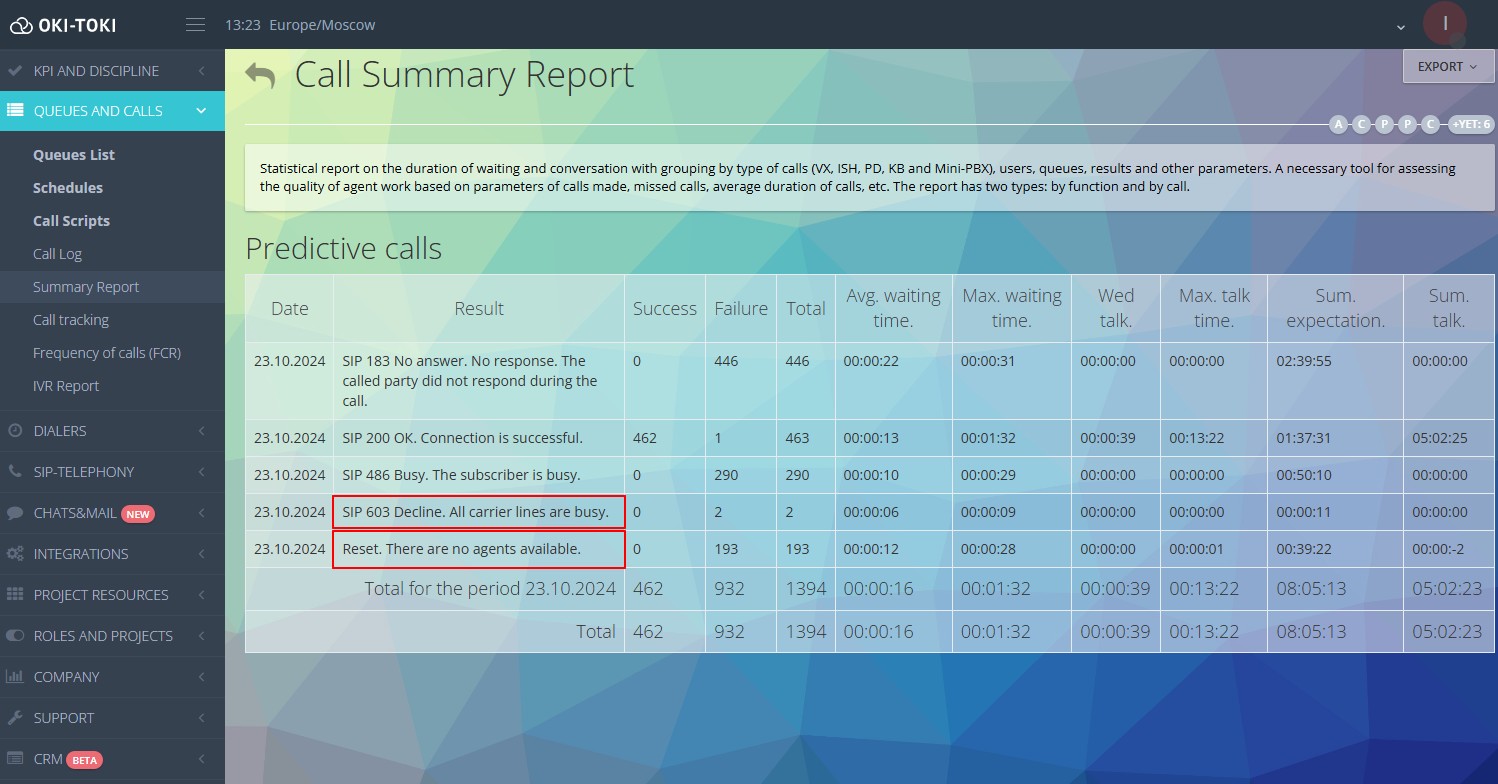
In Oki-Toki there’s a convenient report for this — “Calls Summary“, in the filter you’ll need to check the box “Group by SIP call result”.
You’ll see the distribution of call numbers by codes, how many of them are:
- successful (200),
- busy (486),
- didn’t pick up (183),
- didn’t go through due to lack of lines (603),
- drops, whether there are 503 or mass timeouts.
And these are no longer scattered logs, but structured analytics.
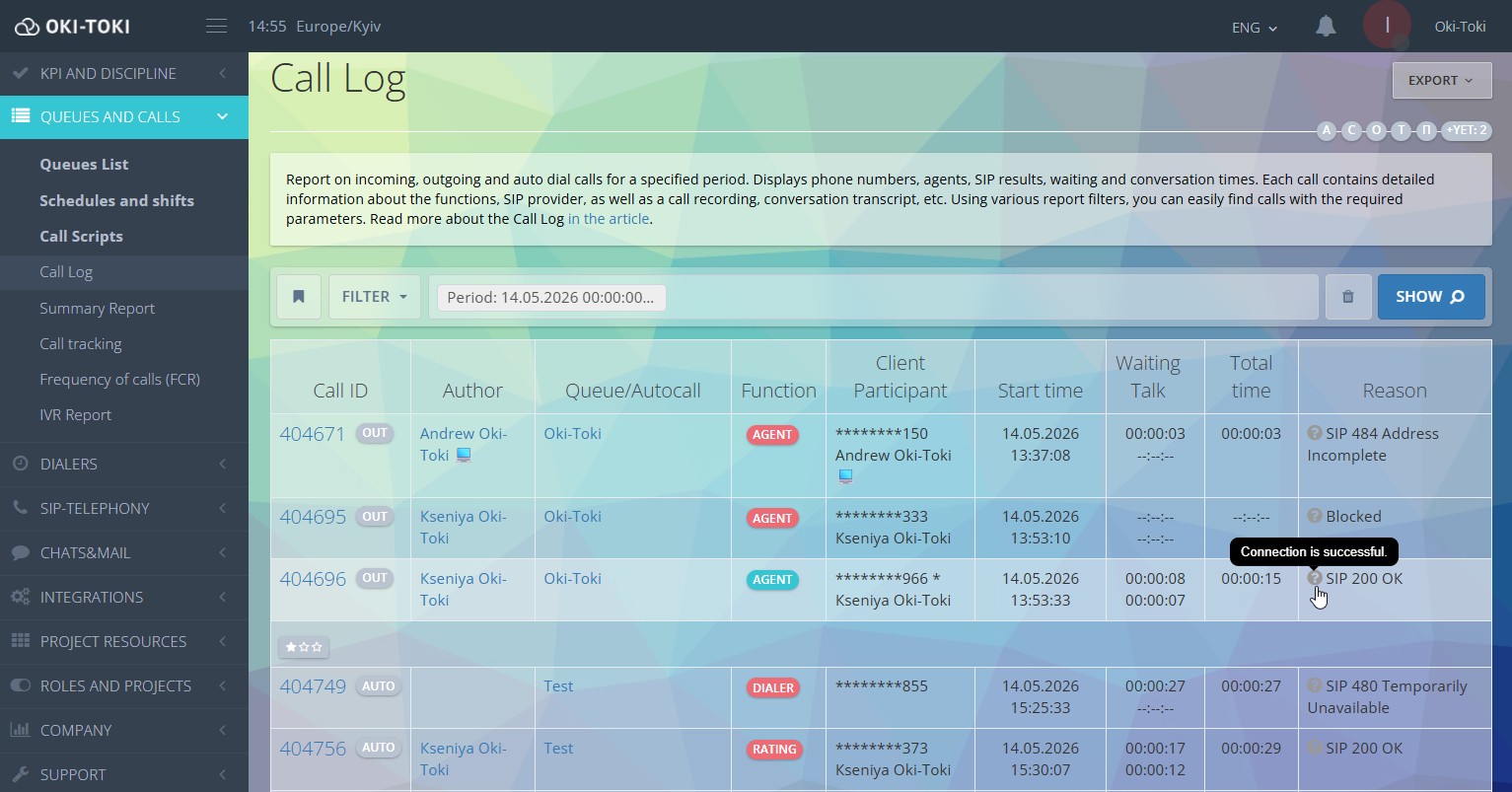
If you need to analyze a specific call in detail — “Call Log“ will do.
The log displays the result of each call. Here it’s not summary statistics, but a detailed picture for each call: time, destination, provider, final SIP code, etc.
Why SIP responses are important for a call center
In short — without them it’s impossible to understand what’s happening.
For example, your connection rate is dropping, agents are sitting without calls, and the dialer widget shows active work. But connection to clients is minimal. If you don’t look at SIP codes – you can guess for a long time. If you look — everything becomes clearer.
When you see 403 — it’s most likely a destination restriction or blocking, 183 — subscribers aren’t picking up, 503 — you need to inform the provider.
Why you need to understand SIP codes in 2026
In 2026 SIP responses are a working tool for contact center managers, analysts, technical support, and integrators.
Telephony has become more distributed, load has increased, regulation has intensified. Understanding SIP codes is no longer a technical whim, but a necessity.
If you manage a call center, work with SIP trunks, or launch a dialer — you need to understand these codes.
It helps:
- find the cause of problems faster;
- understand where the failure is — on your side, ours, or the provider’s;
- analyze connection statistics.
SIP codes are not abstract numbers. They are the telemetry of your calls.
And the sooner you start looking at them consciously, the fewer “mysterious” telephony problems you’ll have.