
An outsourced call center operates with completely different dynamics compared to a corporate contact center. An in-house center can work for years on one solution without touching it if “everything is generally fine.” In outsourcing, it doesn’t work that way. Here, something is constantly changing: projects come and go, conditions are updated, clients add new requirements.
Interestingly,
difficulties are often not in the calls themselves. With calls, everything is usually clear. The main challenges arise around the processes. Who switched where, why the agent ended up “in the wrong status,” why the client’s CRM won’t open again, and the client is already asking for a new report — and of course, preferably today.
Selecting the right software is a way to keep processes under control. What to pay attention to when choosing software — we’ll tell you in this article.
Multi-project capability
A call center can serve a dozen companies simultaneously, and each has its own requirements. Confidentiality is a separate topic. Software for outsourcing must separate access, client databases, scripts, call recordings, agent workflow logic, and reporting.
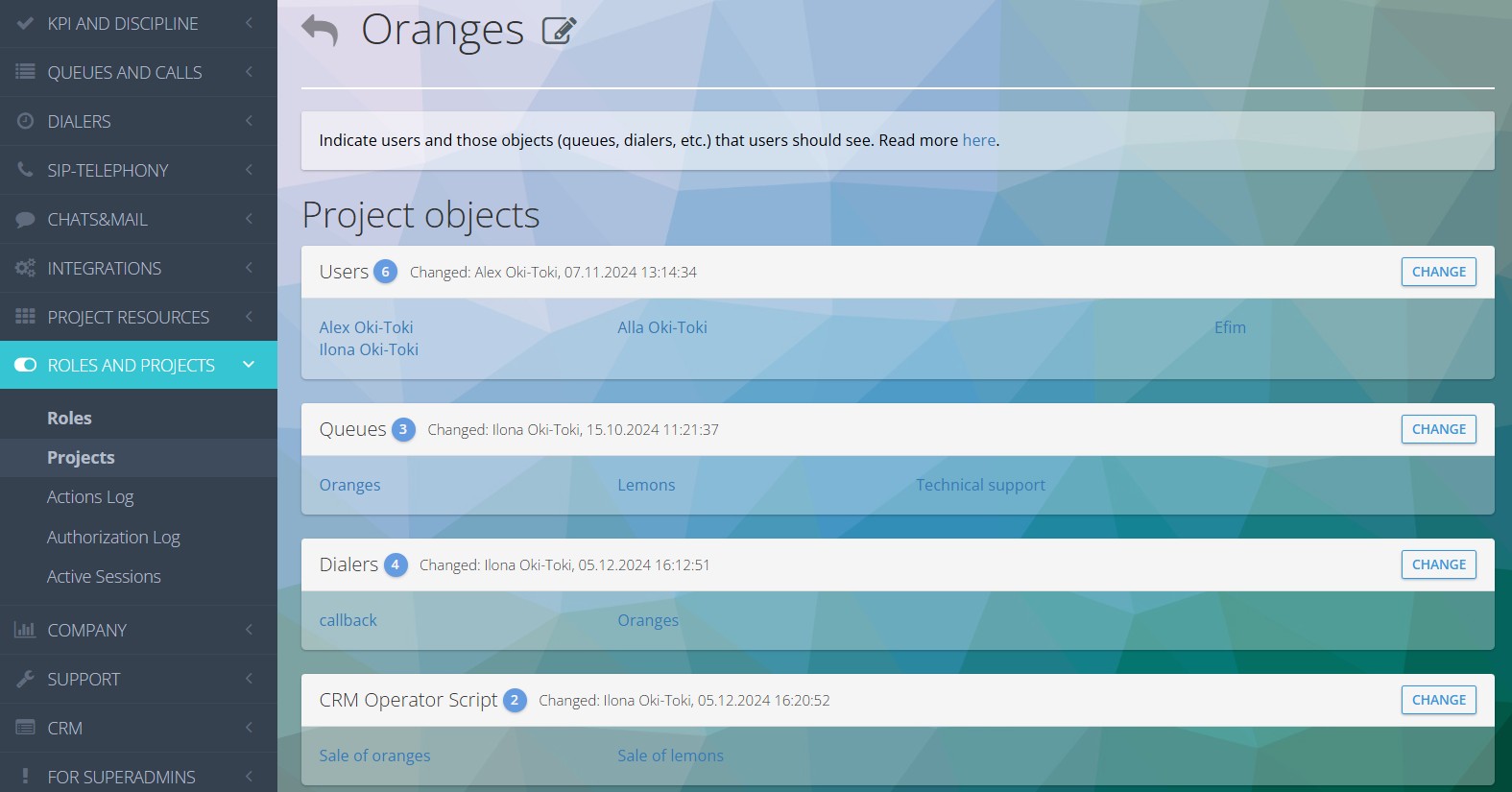
In Oki-Toki, everything is regulated by roles and divided into projects: one client’s data is hidden from another’s users.
The system is designed to be convenient for everyone:
- If an agent combines work on several directions, the system will automatically distribute calls and open the correct script;
- All scripts, voice menus (IVR), queues, dialers are strictly separated. The admin can change settings for one client without affecting or risking breaking the work of others;
- The system automatically separates all statistics. The call center immediately receives ready figures for each client.
Oki-Toki projects are a way to take on completely different companies for outsourcing without creating a separate call center from scratch for each one.
Basic tools: queues, dialers, and scripts
If a call center still dials numbers manually, and for incoming calls agents decide for themselves which call to answer — the project is doomed to losses. Without automation, work speed drops, and the client’s plans fall through. Normal software should manage employee workload and distribute calls without human involvement.
Oki-Toki has everything necessary for this:
- Queues: distribute incoming calls. Here, priorities for lines and employees are configured, black or VIP lists are connected, and callback is linked for processing missed calls.
- Dialers: 5 operating modes for any tasks (Power Dial, Predictive, Callback, Limitless, and Progressive). The system automatically checks time zones, verifies contacts for uniqueness. The call transfers to an agent when a connection with a person is established. This reduces processing time.
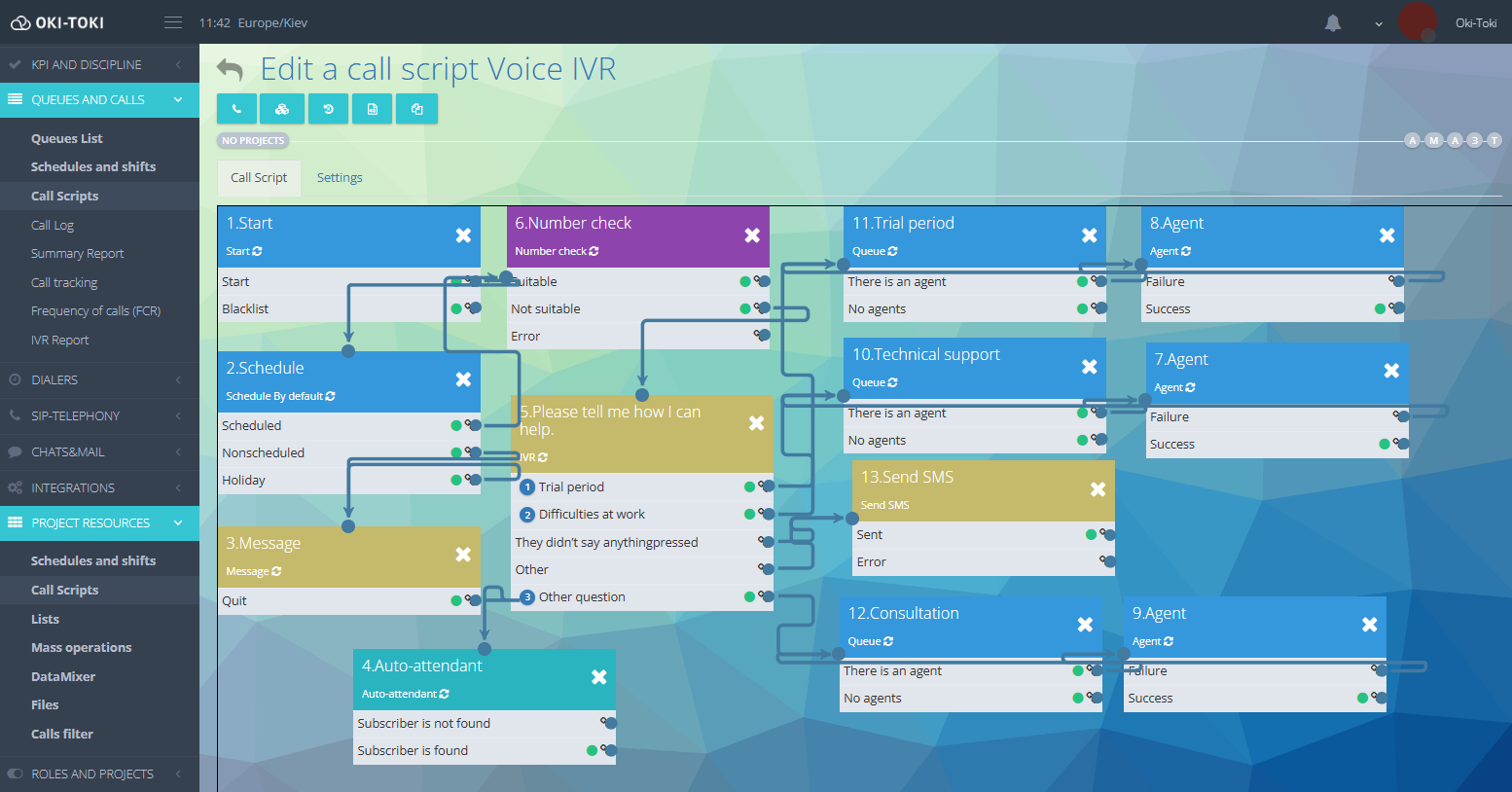
- Call script: this is the call route linked to a queue or dialers. The scheme can be simple (“Start” — “Queue” — “Agent”) or complex: with schedule checking, IVR, voice notification, and automatic SMS sending right during the call.
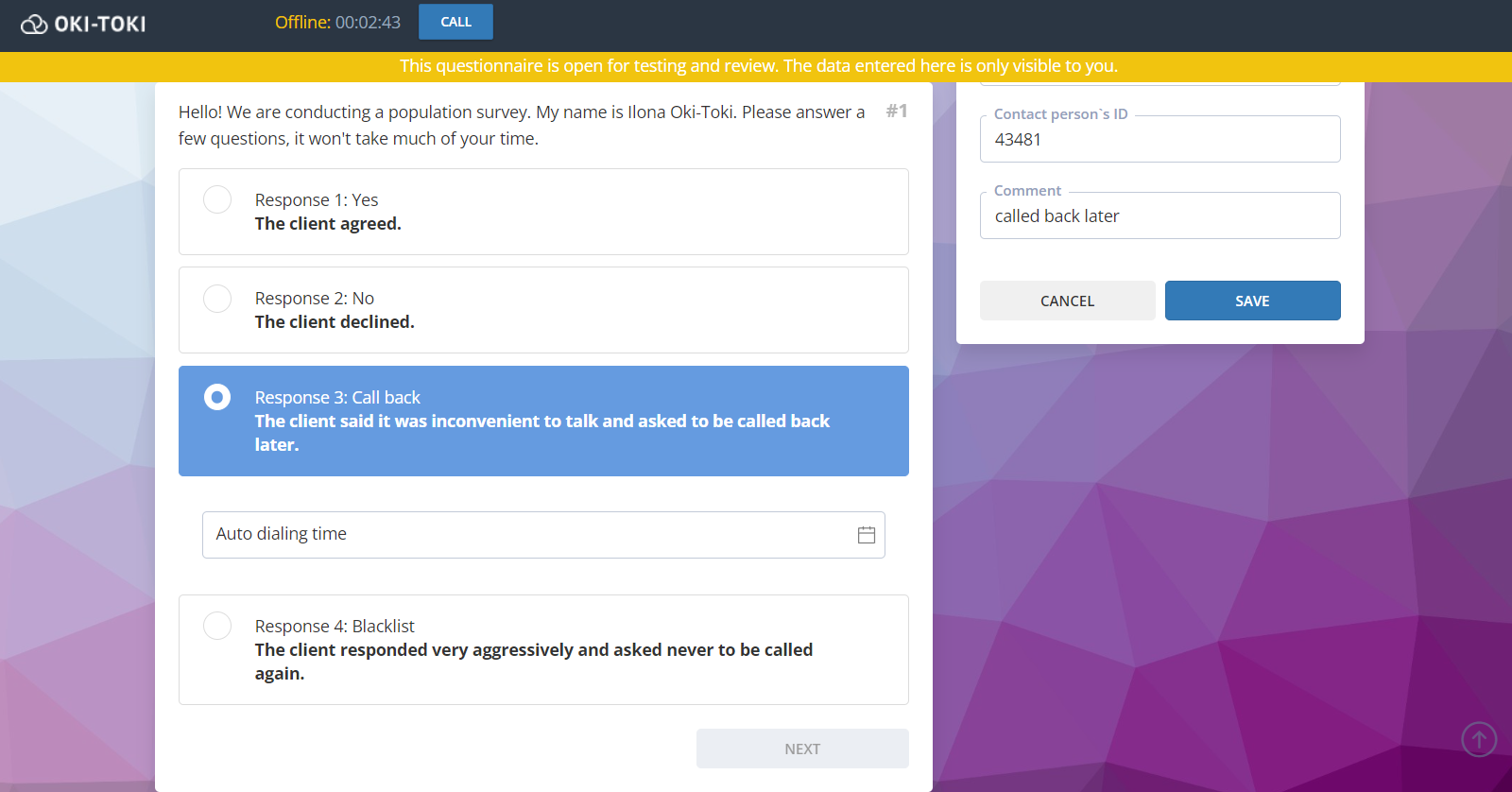
- Agent script: this is a smart dialogue script on the screen, including questions, answers, prompts, hashtags, as well as sending webhooks, transferring a call to another queue, or creating a callback task in the dialer.
This is the foundation of any call center software, without which building normal operations simply won’t work.
Deployment speed and self-service model
Today the client needs a new dialer. Tomorrow — website calling and “add SMS distribution.” In a week — CRM integration that “was written long ago, there’s no documentation, but you’ll connect it somehow.” This is what the real workdays of outsourcers look like.
And if the system can’t quickly adapt — problems begin. Because launch speed and project “fine-tuning” almost directly impact profitability.
A supervisor or project manager must be able to make changes to project settings without outside help. For outsourcing, this is critical. Everything is constantly changing here.
Self-service software setup works best when experts back you up in difficult moments. In Oki-Toki, support is divided into two stages:
- During launch: a specialist is assigned to the call center. They help set up queues, calls, and scripts to ensure a smooth start without failures.
- After launch: in the ticket system, you can ask all questions of interest, and technical support staff will definitely answer them.
This format ensures uninterrupted call center operation — you don’t remain alone with complex settings either at launch or during further work.
Reporting and control for clients
A company that outsources its calls wants complete transparency. It’s important for the client to know exactly how their budget is spent and how well agents handle their customers’ inquiries.
In Oki-Toki, analytics are tailored to three main requests: costs, communication quality, and final results.
- Cost control: for communication and net line work time are recorded to the second, so the client receives honest itemization and sees where the budget goes;
- Quality control: becomes transparent: in one click you can listen to a call recording, check agent ratings, or pull up forms with customer responses;
- Analytics and KPI: summary reports show the real effectiveness of call center work: how quickly agents pick up the phone (SL), how many issues they close from the first call (FCR), and what results dialers bring.
All this data is accessible in the client’s personal account, which provides access to reports, graphs, dashboards, and call recordings for their company.
Oki-Toki has 36 reports, located in different sections: calls, telephony, users — for monitoring indicators. And automatic “Reports” free the call center from manual work. The system collects reports itself and sends them by email on schedule.
Staff optimization and remote work
In outsourcing, people and projects often change. New agents must start working from day one. To avoid memorizing instructions, the program should help them by automatically displaying prompts on the screen, providing ready conversation scripts, and automatically filling in some data. If agents work from home, two things are required from the software: discipline control and launch without installing third-party applications.
Oki-Toki has everything necessary for this:
- Everything in the browser: for agent work, only an internet connection and an open browser tab are needed — no downloads or settings;
- Agent workspace: an agent’s workplace with an intuitive interface and a set of functions. Calls, widgets, scripts, client cards, and statuses are all in one workspace;
- Interactive scripts and prompts: the agent simply clicks on buttons with the client’s answers, and the system automatically switches the screen to the needed dialogue step and shows what to say next;
- Monitoring and Whisper: a supervisor can connect to a conversation in real time. You can simply listen to how the dialogue is going, or turn on “Whisper” mode. Then the agent will hear the manager’s prompt, and the client on the line won’t notice anything;
- Agent statuses: there are 5 main statuses in the agent workspace: Ready, Busy, Call, After Call Work, and Away. For the basic “Away” status, you can create your own sub-statuses: lunch, training, personal matters. There’s also a setting for limiting the number of agents in “Away” status. For example, if only 3 people can be away simultaneously, the system won’t allow a fourth to change status until someone returns to work.
- Workplace presence control: the system checks whether the agent is at their workstation during a call. If they don’t perform any actions in the form (for example, don’t move the mouse), the call will drop and go to another employee, and this agent will get a note “Agent did not confirm presence in the form.”
Oki-Toki reduces remote work and frequent staff turnover risks to zero, turning any computer browser into a fully controlled and ready workstation.
Security and client database protection
Working with clients’ personal data imposes obligations on outsourced call centers to ensure information security. Accidental or intentional leakage of a contact database is a direct risk of contract loss, lawsuits, and reputation destruction.
Software must ensure data isolation not only at the external level but also internally within project teams. Agents should not have the technical ability to mass download or copy information.
To reduce risks, Oki-Toki has:
- Role-based separation: each employee sees only what they are authorized to see according to their position. An agent won’t be able to access the entire platform’s settings, and a supervisor of one project can’t see another client’s data and reports.
- Phone number masking: the agent makes a call and processes the card, but sees on the screen only the name and hidden symbols (asterisks) instead of the actual number. Copying or photographing the database is impossible.
- User activity logging: the system records who made what changes to settings and when, who downloaded audio files, or who imported a database.
- Access restriction: employee authorization tied to allowed IP addresses, and the use of two-factor authentication (2FA).
Oki-Toki closes all loopholes for data leakage: the database is protected by masking, access is limited by roles, and every employee action remains under control.
Integrations and work with third-party CRMs
Outsourcing rarely manages to work in one system — clients often come with their own CRMs. The ability to integrate with a third-party system without endless refinements or the risk of losing leads is a basic software requirement.
In Oki-Toki, data exchange works according to a simple scheme: Event → Action. According to specified conditions, the system responds to a specific event, and integration performs an action — internal or external.
For this, there are three simple tools:
- Open API and external events: automatically transfer data to the client’s CRM, messengers, or email. For example, when a call ends, the system immediately sends the result to the client.
- Internal events: routine automation inside the platform without programmers. The interface has a ready list of commands: in a couple of clicks, you can configure the system to automatically add tasks to the dialer, move contacts between lists, or take an agent off the line. All settings are selected from convenient drop-down menus, so you won’t have to look for API links.
- Event log: this is the general history of all sent data. Here you can easily find any event, see if data was sent to the client, and if needed, send it again manually in one click.
As a result, the call center gets complete automation and control: the software forwards information where needed automatically, and through the Event Log, you can check sending at any time.
Outsourcing is constant movement. The call center that wins is the one that quickly adapts to clients, launches projects without delays, and guarantees data security.
When software closes part of the processes automatically, work becomes easier. Then a new client is a prospect, not stress. Changing an agent is a routine work moment. And volume growth is a confident step forward.
Oki-Toki combines everything needed for this: smart dialing, data protection, comfortable workspace, integrations, and clear reports. Routine becomes less, and opportunities for growth become more.