Customers want quick responses. What if there is a call queue, 20 agents, and dozens of departments or inquiry types? That’s where IVR, which helps create convenient call routing, comes in handy. But you can go further, make this menu not just keypad-based, but voice-controlled, when the client speaks instead of pressing numbers, and the system understands them.
In this article, we’ll discuss what voice IVR is, how speech recognition works in Oki-Toki, how it differs from regular IVR, and why you need all this.
What is IVR?
IVR (Interactive Voice Response) is a system that plays greetings, offers options for selection, and directs the call according to a predefined script. In the classic version, the choice is made using the phone’s keypad, for example: press 1 for the sales department, 2 for technical support, etc.
In Oki-Toki, the menu is assembled from “blocks” in call scripts: “Start”, “IVR”, “Queue”, “Agent”, like building blocks are. You can set up routing, conditions, schedule, queue, and logic without programming and complex integrations.
Voice menu IVR
Since 2018, Oki-Toki has offered voice recognition IVR. This means that the client does not need to press buttons, but can simply say what they want, and the system will understand. Recognition is performed using leading solutions – Google and OpenAI. The obtained text is used by the Oki-Toki system to make a decision and move to the necessary script block. It’s convenient, fast, and makes communication more natural.
According to our internal statistics and observations of our clients, most callers do not notice they are communicating with a robot – especially if the voice sounds natural and the script is correctly built.
How does the voice menu work in practice?
It’s almost the same as with regular DTMF IVR. You create a script, add the “IVR” block and configure the response options. The only difference is that instead of numbers, you specify words the client may speak.
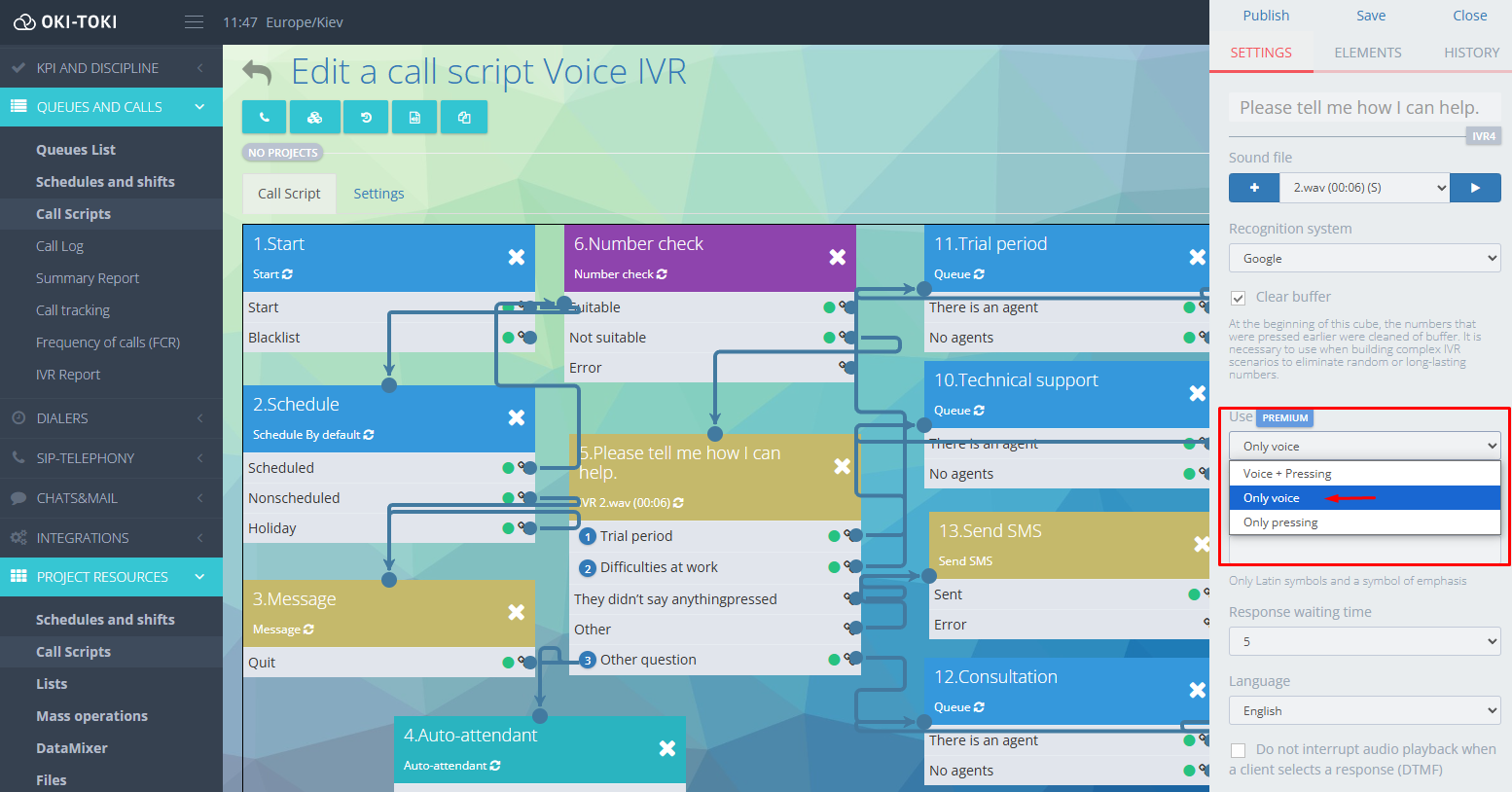
Example: After the greeting, the system plays the pre-recorded IVR message, which offers to choose one of the options depending on the call’s purpose. The client might respond:
- “Want to test,” “test,” “trial access” — this is the first branch;
- “Have a problem,” “need help,” “tech support” — this is the second;
- “Another question” — the third branch.
The speech recognition module will match the client’s response with a list from the dictionary and distribute the call to the appropriate queue.
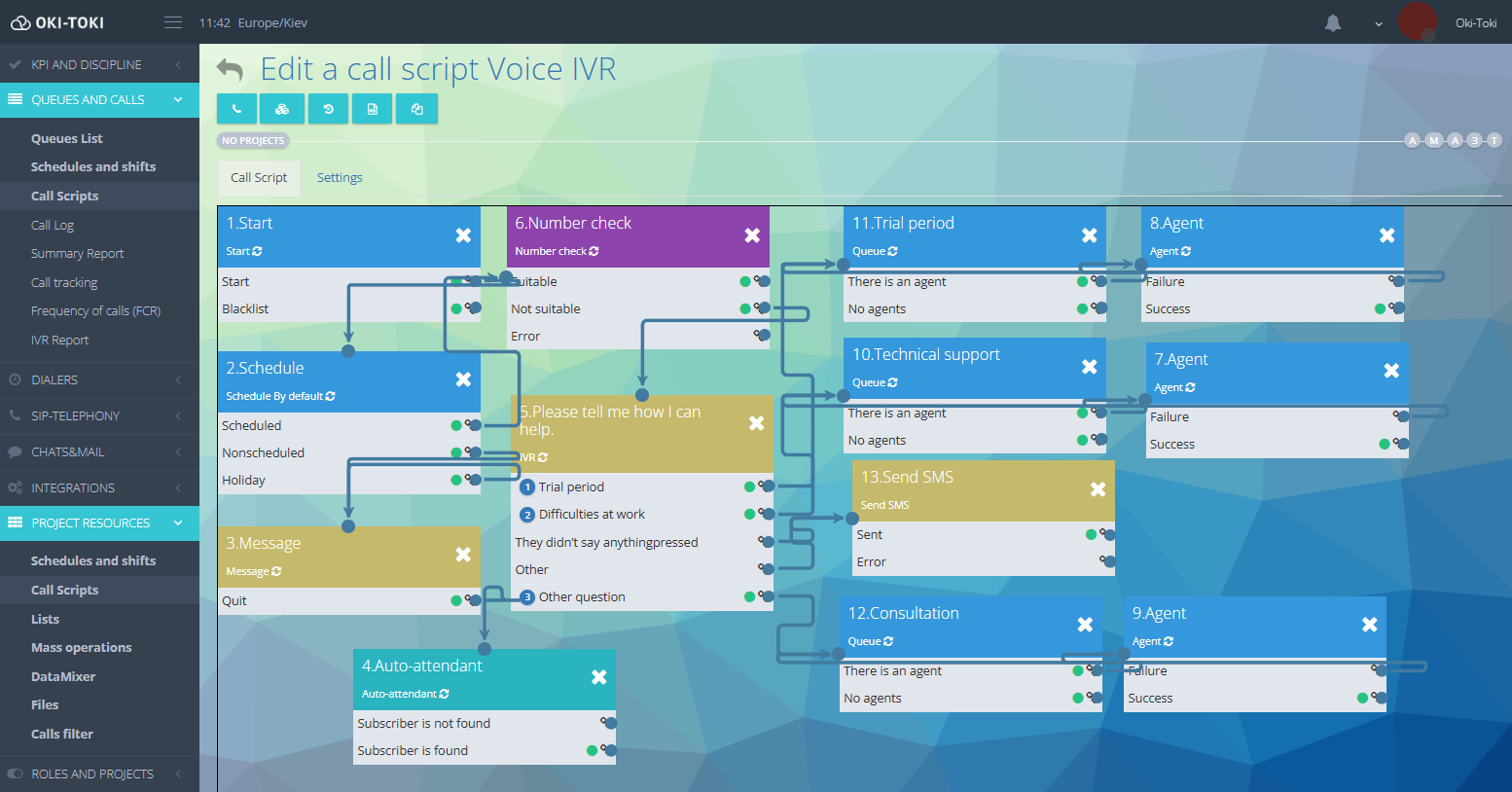
In the script, you adjust dictionaries, add similar words and phrases, so the recognition is flexible. Even if a person speaks with an accent or not quite clearly, the voice IVR system will still understand them and send them on the right path.
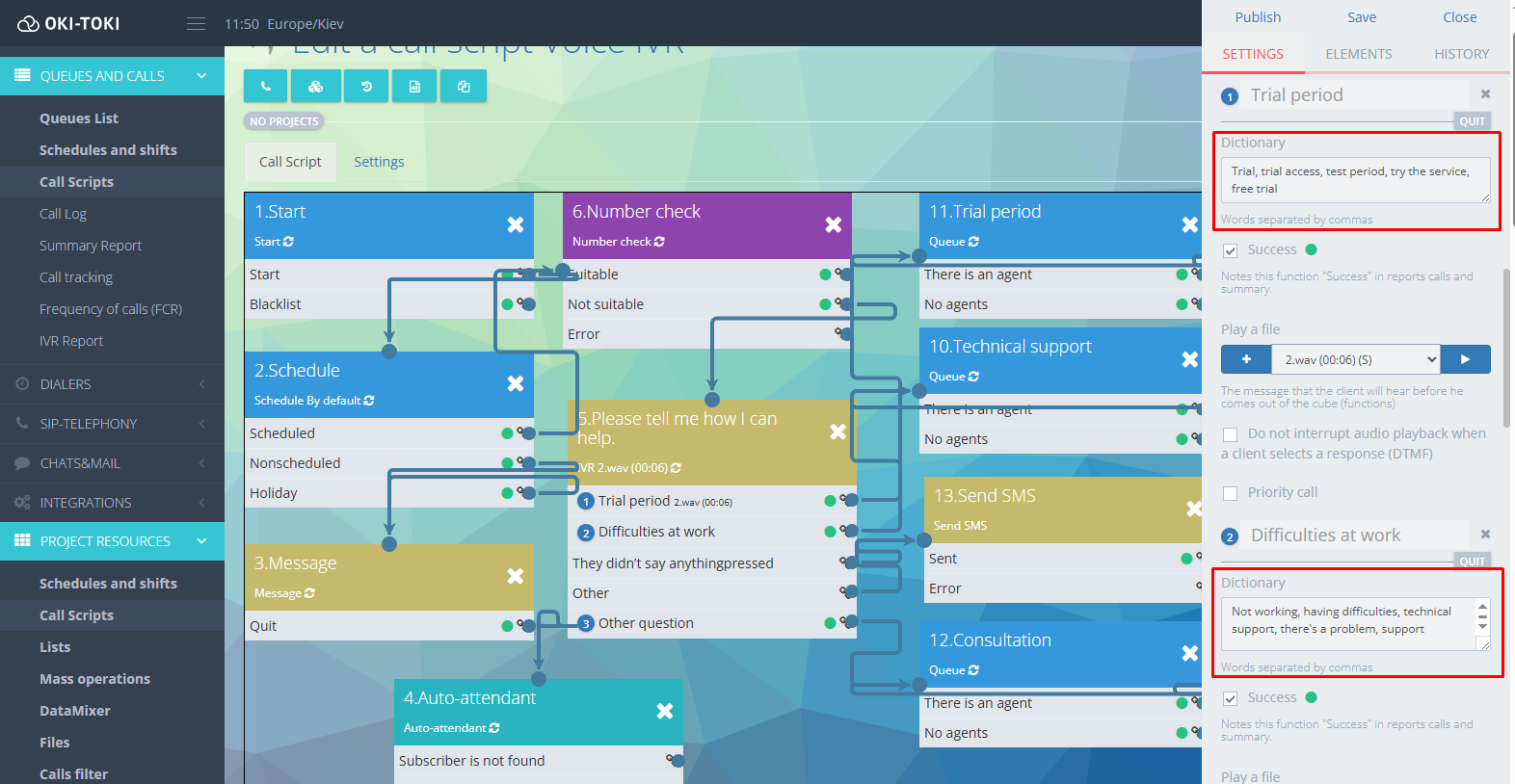
Setting up a script with voice IVR
Here’s what a basic script might look like:
- Start: The entry point of the call.
- Time check: Checks if it’s working hours.
- Contact verification: Checks if the number is in the database.
- Contact creation: If not, creates a new one.
- IVR with speech recognition: The system listens to what the client will say and directs further.
- Queue → agent: In working hours, we connect to the required department.
- SMS: Outside working hours, sends a message confirming a callback.
What can be connected to voice IVR
In the script in Oki-Toki, you can flexibly adjust not only IVR but also everything around it:
- Schedule: set different scripts for different times.
- Integration with CRM: route depending on the client’s status.
- Number verification: Verifies numbers to keep track of all calls, even from new clients.
- Conditional transitions: Changes the logic depending on data, such as for VIP clients, regulars, or new ones.
- Queues and priorities: direct calls where they are expected.
- Sending SMS: immediate information sent to the client or confirming the request.
Advantages of Voice IVR
IVR saves time, simplifies the customer’s journey, and makes calls more comfortable:
- No need to press buttons — especially convenient in the car, on the go, or when the screen is inaccessible;
- The client immediately says what they need — no need to listen to a long list; the user simply pronounces his request.
- The system understands the essence, not just the formulation — one customer says “support”, another – “help”, a third “tech problem”, and all get to the right department.
- Fewer errors and misunderstandings — the person speaks in familiar words, and the system directs precisely according to the script.
- Service becomes faster — there are no unnecessary transitions and redirects, only the necessary route.
Voice IVR helps the call center reduce the load on agents, speed up call processing, and automate routine requests. Agents are freed from routine tasks that a robot can solve, and clients receive the necessary information faster.
Where does this work especially well?
When clients call a company with various questions, it’s important not only to respond quickly but also to understand exactly what the client is inquiring about. The voice menu with speech recognition helps to do this even before connection to an agent – without confusion and long lists of options.
This solution is especially useful for the following areas:
- car dealerships;
- medical centers and clinics;
- online stores;
- delivery and logistics services;
- educational institutions;
- insurance;
- technical support;
- finance, lending, microloans.
Hybrid IVR: Voice + Pressing
In Oki-Toki, you can use hybrid IVR, where both voice control and traditional keypad input work. This is convenient, giving the client a choice—to say what they need or to press a button. This approach increases accuracy and comfort since the system expects either a voice or a press. Both IVR menu options work, and each client chooses what’s easier for them.
Reporting
In Oki-Toki, you can monitor how your voice or hybrid IVR works using reports. So you can timely identify what needs improvement.
- The IVR report will show how many calls went through the “IVR” block, which options were chosen, and where errors or breakdowns occurred. It generates data for a single call script;
- Report: A short summary of call processing, which blocks worked, and which agents took calls;
- Call log: Detailed information for each call, including date, time, route by script, client actions, system responses, errors, and outcome;
- DataMixer: An automatic constructor that combines data from different reports into one. With its help, you can combine the “IVR Report” with the “Call log” or “Task List” and receive data by email for a selected period.
The information from reports is not just numbers. It helps tweak scripts, track how clients interact with the IVR menu, and improve service without guessing or manual checking, relying on facts.
A voice menu with recognition is not about technology; it’s about comfort for clients and the company.