
The contractor takes on a new project, hires agents, and launches the line. Everything is going according to plan: the database is being processed, the client is satisfied. A month passes, and the report shows a loss. And this is despite the fact that, formally, nobody made a mistake.
Such cases happen regularly, and the reason almost always lies at the stage of project evaluation, preparation, and setup. Below, we’ll look at why a project goes into the red from the start and how to prevent it.
- Costing error
- Expensive onboarding and staff turnover in the first weeks
- Infrastructure is not ready for launch
- Metrics drop from day one
- Time without calls: paid hours with no results
- Automation and AI: a necessity, not an advantage
- How Oki-Toki helps avoid losses at launch
Costing error
The most common reason for losses is that the project was sold below its real cost. The contractor relies on past experience and doesn’t take into account the specifics of the particular case. As a result, the actual cost turns out to be higher than what was budgeted.
It’s impossible to predict the price down to the last cent, but the key factors should be checked in advance:
- what the client pays for: per contact, per inquiry, or per result;
- database contactability: if the database is cold, there will be fewer answered calls;
- workload pattern: steady, without sharp spikes, or with periods of higher activity;
- contractor costs: this is not just agent salaries. Project cost is also affected by software expenses, staff training, and contact center maintenance.
To avoid mistakes, it’s better to estimate the project economics before signing the contract: divide total costs by the expected workload and see how much each contact, resolved inquiry, or other outcome costs. If the commercial offer isn’t backed by numbers, the risk of going into the red increases. Read a separate article about unit economics and how to calculate it.
Expensive onboarding and staff turnover in the first weeks
A new project is almost always accompanied by headcount growth. But a new agent does not start generating profit on day one — they first need to be trained. It takes a few months to reach the level of an experienced colleague, and until then they work more slowly, make more mistakes, and require a supervisor’s attention.
Add employee turnover to that: some newcomers leave before they ever break even. The money invested in training them for the client’s project goes with them.
To help newcomers reach target performance faster, training must be short and systematic. That requires tools that guide the agent through a clear process and help the supervisor quickly spot mistakes and provide feedback.
Infrastructure is not ready for launch
The project goes live, but the working environment still isn’t assembled. Telephony is connected at the last minute, the client’s CRM is integrated during the process, and routing and scripts are adjusted on the fly. As a result, the first weeks are spent not on customer work, but on technical fixes.
Project preparation should start in advance. Before launch, the client should provide the contractor with everything needed for setup:
- the customer database and other data needed for work;
- the telecom provider’s details for registering the SIP profile;
- the inquiry-handling logic and agent scripts;
- access credentials and data for integrations with third-party systems;
- a list of the required reports and metrics, along with their format and delivery frequency;
- information about communication channels and how they are used.
Based on this data, the contractor prepares the agents’ workspace, connects communication channels, and configures scripts, routing, and integrations.
The earlier both sides agree on the details and exchange the necessary data, the more time there will be to set up and test the project before launch.
Metrics drop from day one
In the contract, the client sets target metrics: service level, average handling time, first contact resolution rate, connection rate. Miss the targets — penalties begin, and sometimes the contract is terminated early.
Often, poor performance is noticed too late. Service level dropped in the first week, but the contractor only saw it in the monthly report, by which point the penalty had already been applied. That’s why metrics need to be checked every day: real-time visibility shows where the project is slipping and when it’s time to step in.
Time without calls: paid hours with no results
Not all of an agent’s working time is spent talking to customers. On outbound lines, part of the shift goes to waiting for an answer and listening to ringback tones during manual dialing. On inbound lines, it goes to periods without calls because of uneven workload. To reduce idle time, automation and smart workload distribution are used:
- dialer: the system dials numbers automatically, filters out unanswered attempts, and connects the agent only with a customer who picked up;
- call distribution: calls are routed to available agents according to defined rules;
- schedule planning: shifts are built around actual workload and peak hours;
- real-time monitoring: downtime or overload is visible immediately, and staff can be reassigned.
As a result, the agent spends less time waiting and can handle more inquiries.
Automation and AI: a necessity, not an advantage
By 2026, some inquiries no longer require an agent. Voice bots, chatbots, and self-service scripts handle common requests faster and at a lower cost. The more inquiries automation takes over, the lower the cost of serving one customer. For a new project, this is especially important: extra expenses in the first weeks directly affect payback.
AI can also be used for quality control: analyzing all conversations instead of a small sample, spotting mistakes faster, and identifying weak points in agent performance.
NEW: Oki-Toki is testing an AI agent for QA in closed beta. It checks conversations against your checklist across the entire call database, not just a random sample. Want to participate? Leave an application or create a ticket.
How Oki-Toki helps avoid losses at launch
Almost all of the problems described above can be prevented before launch. What helps is not a set of disconnected tools, but a single platform that covers the main contact center processes: from project launch to quality control and analytics. Oki-Toki has everything needed to make a project successful from day one:
Fast launch
Oki-Toki is a cloud platform and requires no in-house infrastructure. An agent only needs a computer or laptop with internet access. A new project starts faster, without server costs or maintenance.
Agent onboarding
The agent workspace brings together everything needed to handle inquiries: calls, conversation scripts, customer data, and widgets.
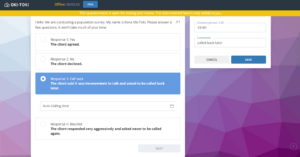
During the call, a ready-made script will open — a CRM form that helps a newcomer get up to speed faster and helps an experienced agent maintain communication standards.
To train an agent, prompt them during the call, or monitor the quality of customer communication, a supervisor can join a call for listening, use whisper coaching, or intercept the call.
More conversations, less downtime
The dialer reduces manual dialing and waiting for answers, and five dialing modes let you choose the right option for a specific project.
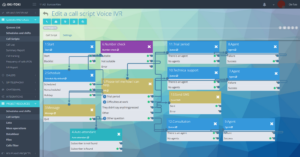
For an inbound line, there is a call flow builder, IVR, and priorities to distribute workload more evenly and increase the number of handled inquiries.
Quality and performance assessment
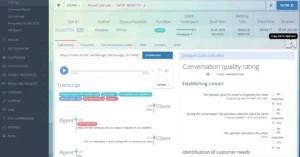
After a call, you can listen to the recording, evaluate the conversation against set criteria, and review the agent’s or team’s KPI. Speech analytics automatically analyzes conversations and highlights problem areas that might be missed in a standard sample-based review.
Contact center performance monitoring
Widgets in Oki-Toki show what is happening in the contact center right now: current line load, how many inquiries are in the queue, which agents are busy, which are free, where wait times are growing, and on which project a problem may appear.
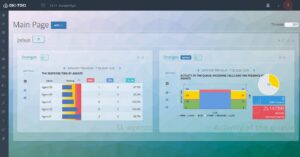
Reports on calls and agents help make sense of the situation: they show the number of answered and missed calls, wait time, team occupancy, agent statuses, and other metrics.
And the automatic “Report” will be sent regularly to email, so managers receive a summary without manual data export.
Custom fit for the client’s processes
Integrations with third-party systems make it possible to exchange data between Oki-Toki, the CRM, and other client services. Information about customers, calls, and handling results is automatically transferred between systems, and agents do not need to enter data manually. Combined with flexible configuration of routing, handling scripts, and business processes, the platform can be adapted to any project and helps onboard new clients faster without changing their familiar workflows.
The first month tests preparation, not luck. If the project is built on a reliable technological foundation and the team works in one system from day one, the manager can focus on growing the business instead of dealing with the fallout.