
MFIs handle large volumes of outbound calls: new applications need to be processed quickly, payment reminders must go out on time, and delinquent accounts require follow-up with customers. With manual dialing, agents spend part of their shift waiting for answers and dealing with unanswered calls, so when the contact list is large, this approach becomes inconvenient.
A dialer takes over this routine: the system dials numbers automatically, logs the result of each attempt, and retries according to predefined rules. As a result, agents have more time to talk to customers, and work with the database becomes more consistent.
Let’s take a look at how a dialer works in Oki-Toki, how dialing modes differ, and which settings matter for different tasks.
Where dialers are used in microfinance institution
sA dialer is useful not only for overdue debts. It can be used for:
- fast follow-up after a new application;
- bringing back customers who left an application unfinished;
- confirming or clarifying details;
- payment reminders;
- debt notifications;
- repeat attempts to reach a customer;
- service notifications and surveys.
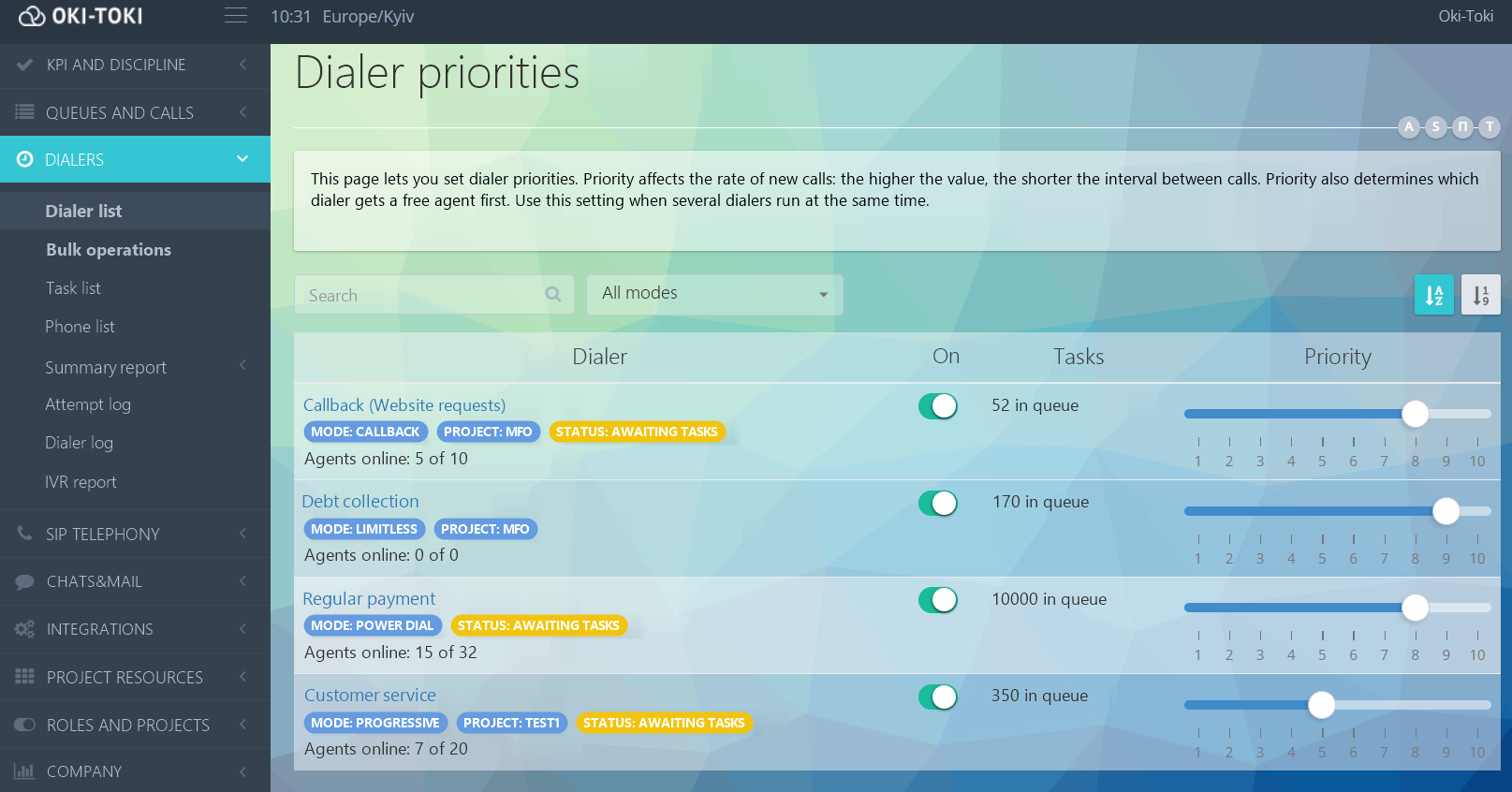
In Oki-Toki, you can create separate dialers for different tasks with their own settings: mode, schedule, number of attempts, script, and agent group. If several dialers are running at the same time, the “Dialer Priority” setting determines which one will call more often and receive an available agent first.
Automation primarily affects working time utilization and the quality of list processing:
- more conversations per shift — agents spend less time dialing and waiting for answers;
- new applications are processed faster — fresh contacts can be moved higher in the queue;
- follow-up calls are not missed — the system automatically schedules the next dialing attempt;
- workload is easier to manage — intensity and priority can be adjusted to the current task;
- results are saved automatically — for each attempt, you can see whether a conversation took place or the call ended without a connection
How a dialer works
In Oki-Toki, dialing intensity is handled by dialing modes, while the script controls what happens after the call connects
Dialing modes in Oki-Toki
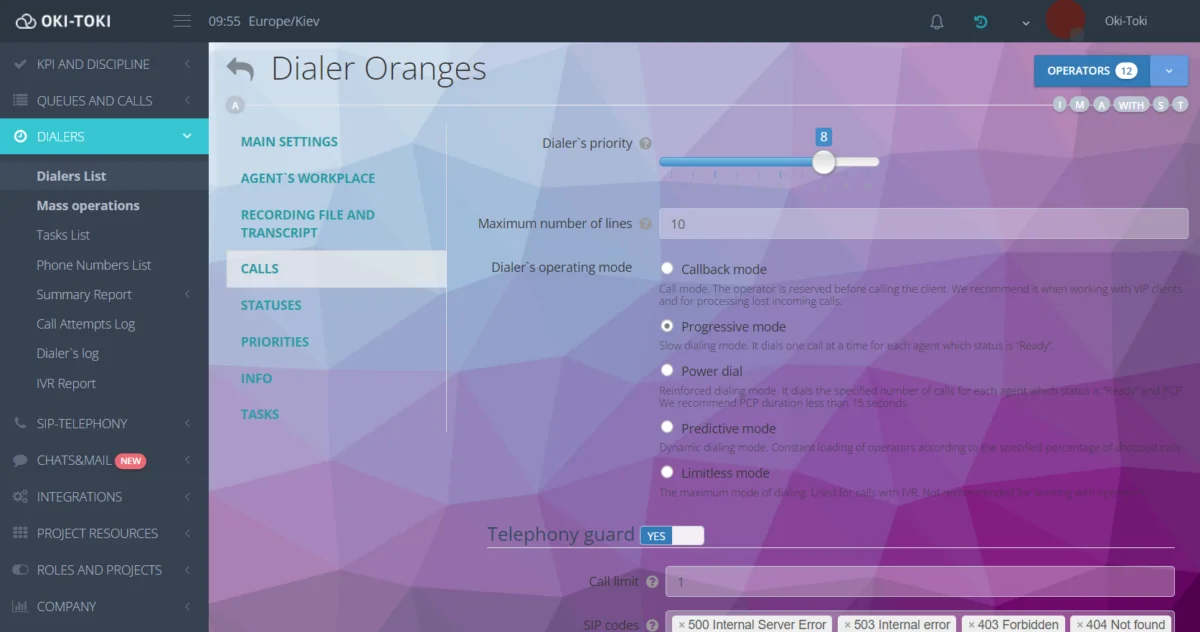
The modes differ in how calls are initiated and how agent availability is taken into account:
- Callback — for scheduled callbacks and missed calls. The system connects to an agent first, then dials the customer. You can keep some staff available for inbound calls and assign the callback to the agent who has already spoken with the customer.
- Progressive — launches one call for each available agent in the “Ready” status. Suitable for teams of up to about 5 agents and lists with a high probability of answer.
- Power Dial — an enhanced mode. You can assign several lines per agent in the “Ready” or PCP status, so the next number is dialed while post-call processing is still underway. For this mode, PCP under 15 seconds is recommended.
- Predictive — automatically adjusts pacing based on the number of agents and the configured share of dropped calls. Suitable for larger teams, roughly from 10-15 agents.
- Limitless — mass dialing without being tied to agents. Used for automated calls: auto-informer, IVR reminders, and voice bots.
The number of simultaneous calls is limited by line settings and the capabilities of the SIP provider. How to connect a SIP trunk and a SIP client is covered in separate articles.
What happens after the connection
After the customer answers, the next step depends on the script. Once the customer answers, the call can be transferred to an agent immediately, or an automated script can be launched.
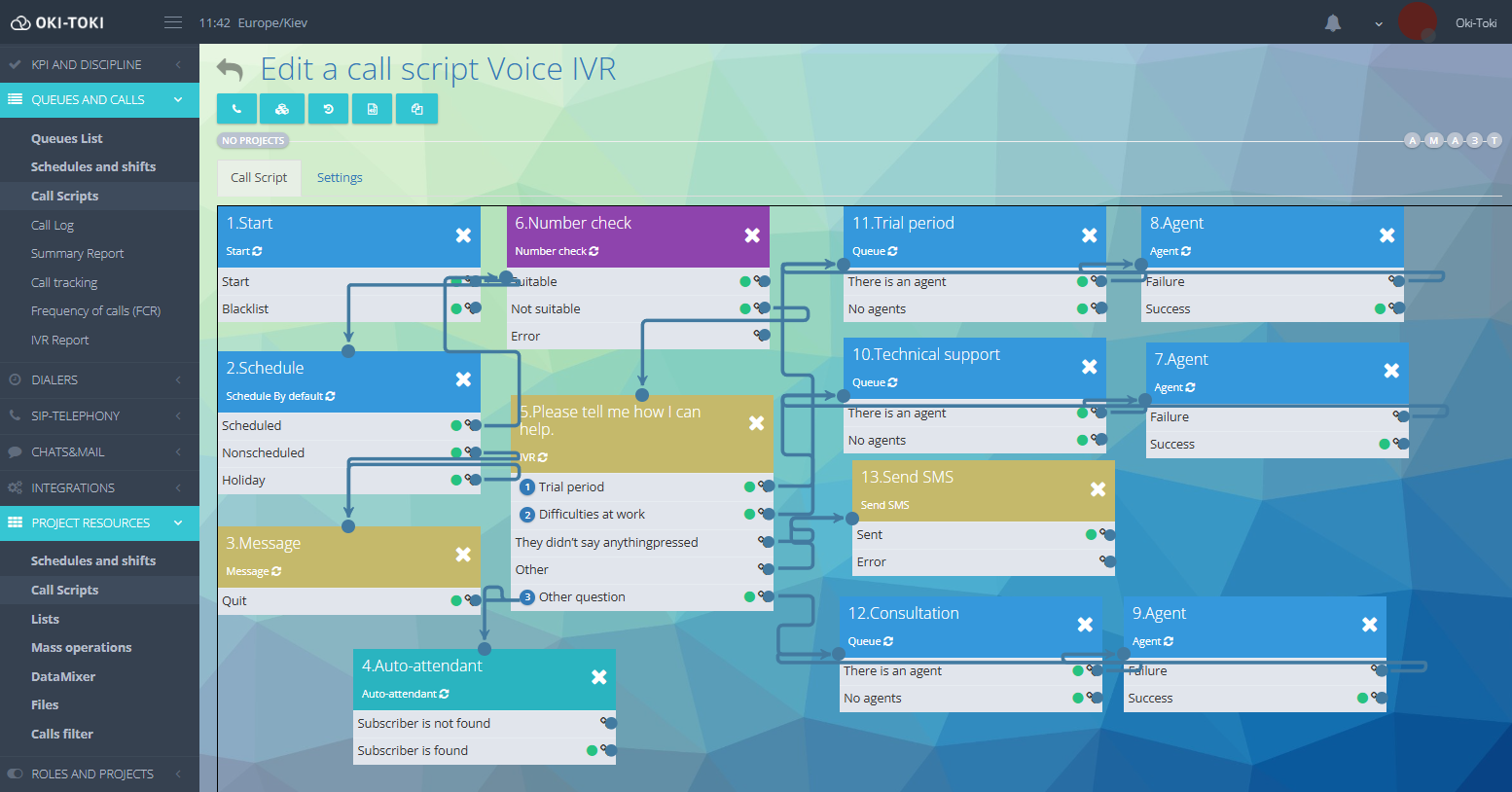
In Oki-Toki, a script is built from “building blocks”: message playback, IVR, transfer to a queue or to an agent, SMS sending, adding a task to another dialer, and other actions. Transitions between them depend on the customer’s response or the result of the previous step.
IVR is suitable for simple scripts with predefined options. The system can remind the customer about a payment, announce the amount, accept keypad input or a voice response, and connect to an agent if needed. Read more about IVR with speech recognition in a separate article.
If you need a more open-ended conversation, you can use a voice bot (Autoagent). It recognizes and synthesizes speech, understands names, addresses, and numbers, and if the conversation goes beyond the script, it transfers the call to a staff member.
For more complex customer conversations, you can use voice AI agents. Unlike IVR and scripted bots, they are not limited to predefined dialogue branches. An AI agent understands the customer’s free-form speech, responds in its own words, clarifies details, and can use data from CRM — for example, to state the payment amount or application status. If the issue is outside its scope or the customer needs a live person, the AI agent transfers the conversation to an agent.
These solutions are still only beginning to be used in MFIs and require careful setup: it is important to define in advance which questions the AI agent can handle on its own and to check whether local legislation allows automated conversations with debtors.
How a dialer works at different stages
Settings change depending on the task. For a new application, the speed of the first contact matters; for payment reminders, volume matters; and when working with delinquent accounts, the history of previous attempts and commitments matters.
New application
New applications can be added to the dialer automatically via REST API or imported from a spreadsheet. Uniqueness control helps prevent duplicate tasks for the same customer
In Oki-Toki, the calling order can be configured by several criteria:
- “Task creation time” — newest first or oldest first;
- “Scheduled call time” — overdue first or on-time first;
- “Region” — nearby or distant;
- “Number of attempts” — minimum or maximum.
For fresh applications, it makes sense to set “Task creation time” first and choose “newest first.” If the customer does not answer, the next attempt is made automatically. The “Task freshness, min” setting limits how long the application remains in the dialer.
Payment reminder
Some calls can be made without an agent. For example, IVR can announce the payment date and amount, offer to confirm receipt of the information, or route the caller to a staff member.
For mass calling, you can use Limitless: it does not wait for an available agent and works with multiple lines. Those who do not answer can be sent an SMS or a voice message with the same information.
Debt management
For overdue accounts, contact history matters: the number of attempts, the result of the last conversation, a payment promise, and the date of the next call.
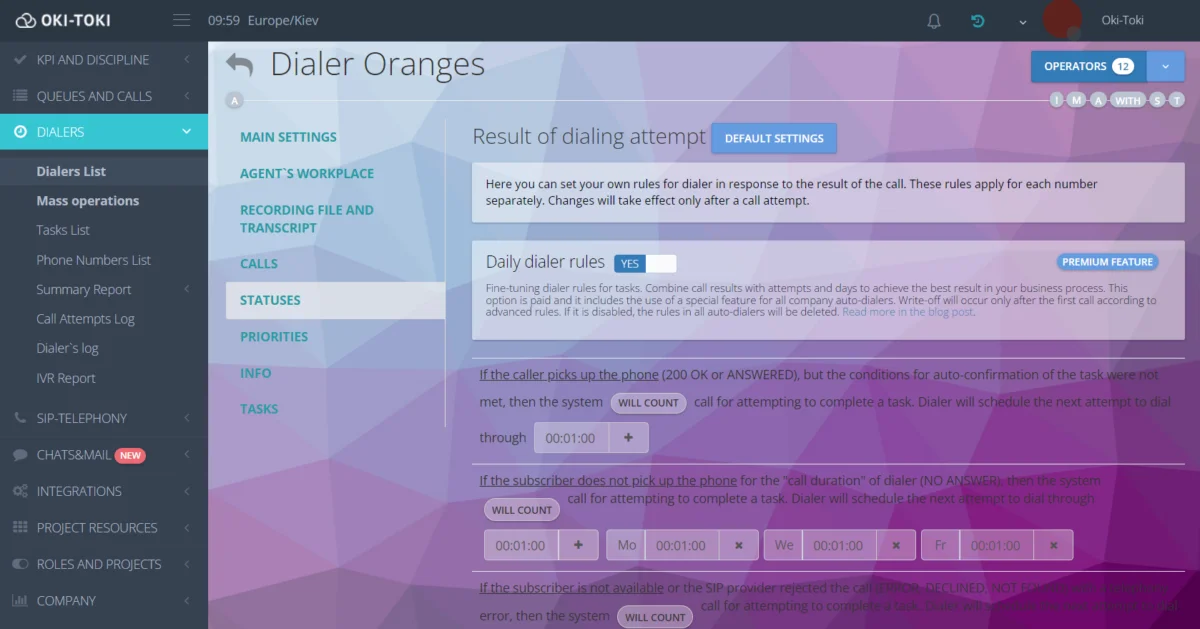
Some of the logic can be tied to the agent script (form). For example, if the outcome is “Promised to pay,” the staff member enters the date, and the system schedules the next contact according to the defined rules. Depending on the result, the task can be completed or moved to another dialer, and the number can be added to the debtors list. “Per-day dialer rules” make it possible to change intervals and call frequency depending on the day of the week or task age.
Requirements for debt collection depend on the laws of each country, so time and contact-frequency restrictions must be taken into account during setup.
How to set up a dialer
Before launching, you need to define who to call, how many attempts to make, how long to wait before retrying, and what should happen after the customer answers.
In Oki-Toki, the main settings are configured separately.
- number of attempts — in “Retry attempts”;
- answer wait time — in “Call duration”;
- retry after “busy,” “no answer,” or “unreachable” — in the “Statuses” tab;
- calling hours — via the dialer and customer schedules;
- time zone — detected automatically by the number code;
- exceptions — via the blacklist;
- actions after answer — in the call script;
- result — in the agent form, CRM, or via webhooks.
Call results can be sent immediately to an external system via webhooks — for example, sending a task status to a third-party CRM when it is completed.
Which metrics to track
The number of calls alone does not show how effective a dialer is. It is more important to look at the results:
- Contact Rate — the percentage of calls that ended in a conversation with the customer;
- RPC, Right Party Contact — successful contact with the actual borrower;
- Attempts per Contact — the average number of repeat calls before a successful contact;
- Operator Utilization — the share of working time spent in conversations;
- Conversion Rate — the effectiveness of contacts: payment, application completion, or another desired action;
- Promise to Pay — the number of customers who confirmed they were ready to make a payment;
- Kept Promise Rate — the ratio of actual payments to promises made.
In Oki-Toki, results can be reviewed in consolidated reports, the “Attempt Log,” and the “Report.” Metrics recorded by the agent, such as RPC or a payment promise, can be collected in form reports.
How to collect dialer statistics is covered in a separate article.
Common mistakes when launching
Results are affected not only by the modes, but also by how the list is managed. Common mistakes include:
- using the same rules for new applications and debt collection;;
- retrying too often;;
- failing to account for time zones;;
- continuing calls after the goal has already been achieved;;
- no CRM synchronization;;
- routing to an agent in scripts where IVR is enough;;
- evaluating performance only by the number of calls;
Another risk is telephony failure. In Oki-Toki, a dialer can be automatically stopped after a set number of consecutive SIP responses so that attempts are not wasted across the entire list.
A dialer helps MFIs process their lists faster, make repeat attempts without manual control, and use agents where a real conversation is actually needed.
The result depends on three things: the right dialing mode, the list-handling rules, and the script after the customer answers. If they are configured for a specific task, the dialer becomes a tool for managing outbound communications rather than just a way to make more calls.