

To begin with, let’s figure out what handling inbound calls means: it’s when a customer dials a call center number, their call is received, registered, and processed. Such a flow of calls is crucial for many contact services. After all, when someone calls a company, they hope to get a quick response and have their issue resolved in a minimal amount of time. Thus, it’s essential to smartly set up the call reception process and manage applications.
In the article below, we describe simple ways to enhance the quality of your hotline and explain how the cloud-based call center Oki-Toki can assist you.
How calls and applications are processed
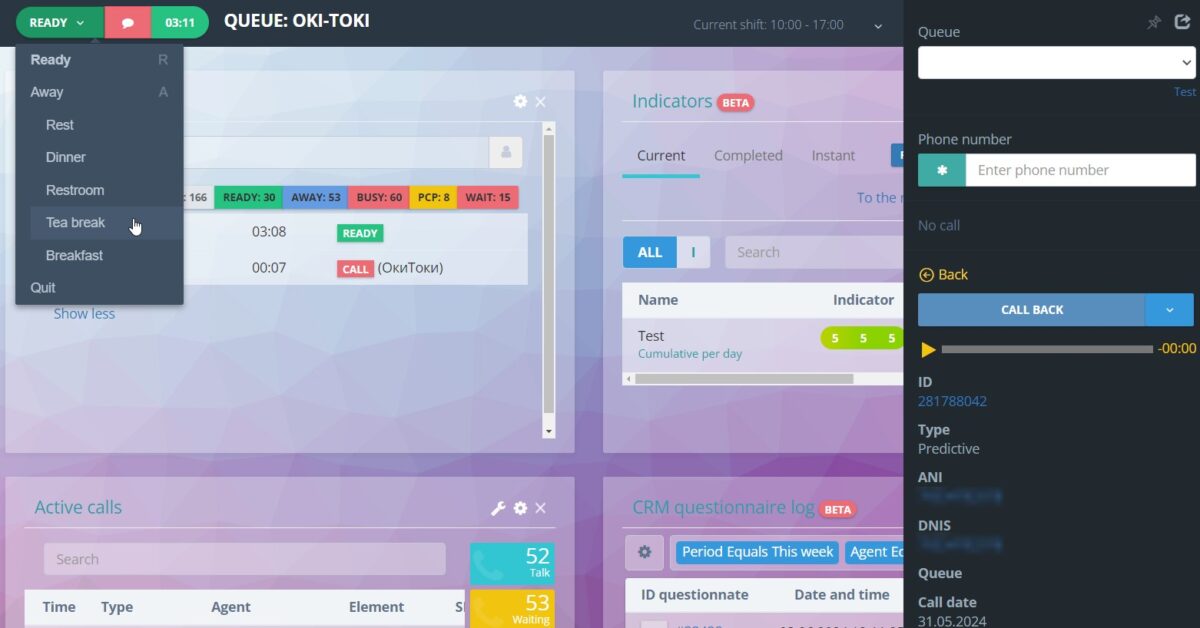
Processing inbound calls from customers involves contact center agents (or a voice assistant robot, but more on that later) receiving calls and dealing with requests. Usually, several stages occur: first, the PBX receives the call, then it goes to the queue or directly to an available specialist, and finally, employees converse with the caller. During the dialogue, an agent might use additional options, such as putting the call on hold, adding it to a conference, or sending an SMS or email to the customer. Everything depends on the company’s specific needs. The main aspects are the agent’s efficiency, quality of work, and a well-adjusted call scheme.
Detailed instructions on how to create an inbound line with Oki-Toki can be found in a separate article.
What are the differences between cloud and local services
There are two main types of software for call centers: cloud-based and local. Local (server-based) solutions mean that the software is located on the company’s own equipment, which can be quite costly, requiring significant investments and constant tech support. We also offer a server solution, which you can read about on our site.
But cloud-based call centers (for example, Oki-Toki) work on a different model. The developer provides the server infrastructure, data and services are “in the cloud,” and to use it, you just need a computer with internet access.
What are the benefits of a cloud-based call center
Cloud software offers more advantages compared to server-based solutions; let’s highlight a few important qualities:
- Availability. Cloud-based call centers work via the internet, so agents can work from any location — be it from home, another office, or on a business trip. This is convenient, especially if you need to organize remote work.
- Savings. Cloud-based call centers don’t require significant investments in equipment. Everything works over the internet, meaning there’s no need to spend money on expensive servers and their maintenance.
- Quick Setup. Setting up and launching a cloud-based call center is much easier than deploying a server system. There’s no need for equipment installation or server configuration — everything works as soon as you connect to the internet.
- Effortless Updates All updates and improvements happen automatically. You don’t have to worry about downloading and installing the latest software versions, as you would with a server system.
- Monitoring. With a cloud-based call center, it’s easy to monitor performance indicators in real-time, whether it’s the number of accepted calls or wait time. This is much more convenient and positively impacts the quality of service.
- Integration. The cloud system easily integrates with other platforms, simplifying agent tasks if, for example, applications need to be recorded in an external program.
- Scalability. You can quickly adjust settings depending on the specific case or situation. For instance, during peak loads, it’s easy to add new agents to the line or adjust the intensity of dialer calls.
A cloud-based call center is a convenient and cost-effective solution for businesses focused on providing quality service for inbound calls. Savings on equipment, availability, and quick setup — all this is guaranteed.
If your customers often hang up without waiting for an agent, read our article with helpful tips.
Inbound calls through Oki-Toki
Oki-Toki has been on the market since 2005, and during this time, it has grown from a small system into a full-fledged platform for call centers. To keep up with the times, we evolve and add new functions. We have everything you need for handling your telephone calls:
- Inbound call routing
Calls are automatically directed to a queue, group, or the required agent depending on their priorities and workload. We’ve described 10 routing strategies in a separate article. - Call script
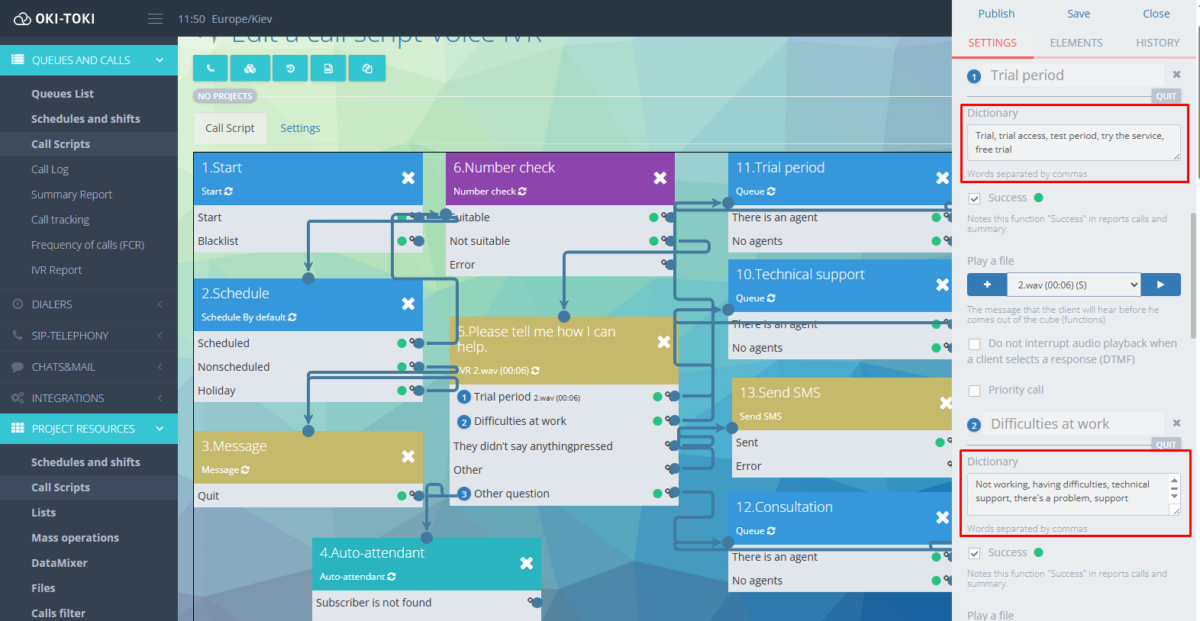
It’s used to indicate where the inbound request will go. That is, it involves creating a scheme by which the call will proceed when the customer reaches the line. For instance, you can specify schedule checking, implement an IVR with distribution, redirection, queue holding music, agents, and so on. - Interactive Voice Response – IVR
IVR is perfect for allowing customers to choose the required department or direction using button presses (or voice commands).
- Queue
The Queue feature in Oki-Toki is a way to set up the line for inbound and outgoing calls. With a vast number of functions, you can make everything as convenient as possible: connect to the blacklist, adjust the transcript, file name upon download, priorities, time zone, and CRM questionnaire. - Schedule
You can configure which hours and days agents are available for inbound inquiries, and when not — the system will automatically direct the customer according to the script. - CRM questionnaire
This is a ready-made algorithm for communicating with customers — scripts. Agents will always know what to say and when. It also shows information about the customer: communication history, order data, and other details. - Webhook
Integration of Oki-Toki with other services for data exchange. For example, you can create a webhook if an agent did not accept an inbound call – information will be transferred, for example, to Telegram. Or set up an action if the same customer calls the line multiple times. - KPI
Norms and requirements for monitoring key performance indicators of agents, to understand who performs better and who violates the rules. - Transcript
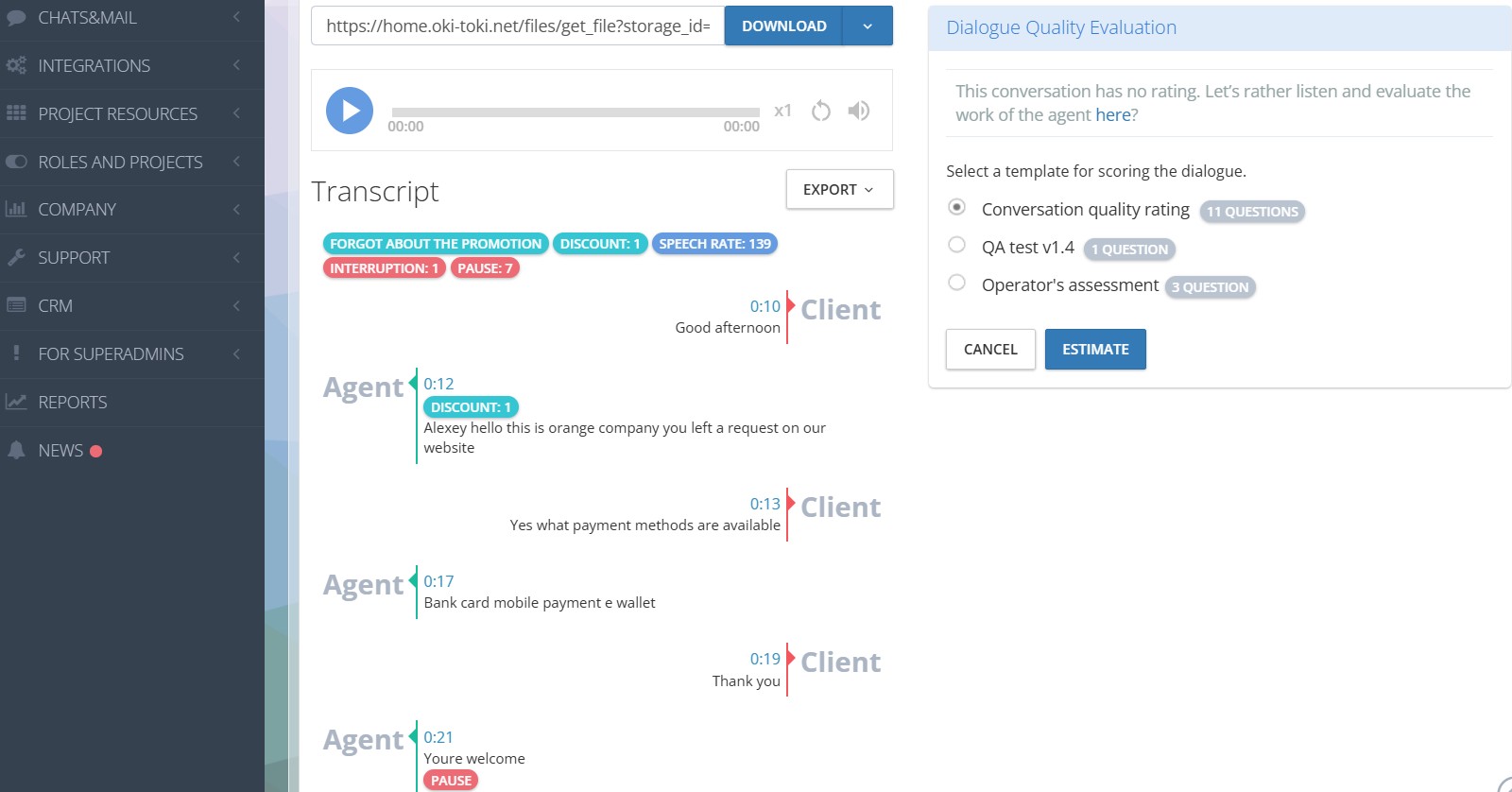
All calls can be recorded and transcribed. Oki-Toki offers one-way (free, converting only the agent’s dialogue into text) or two-way transcription, along with a choice of different languages and speech analytics.
- Data Export
All report data can be easily exported in several formats (HTML, CSV Excel, CSV Google Sheets). Conversation recordings can be downloaded or uploaded to Google Drive. - VIP
You can create a VIP numbers list to prioritize important clients, directing their calls to an agent in a priority order. - Infographics
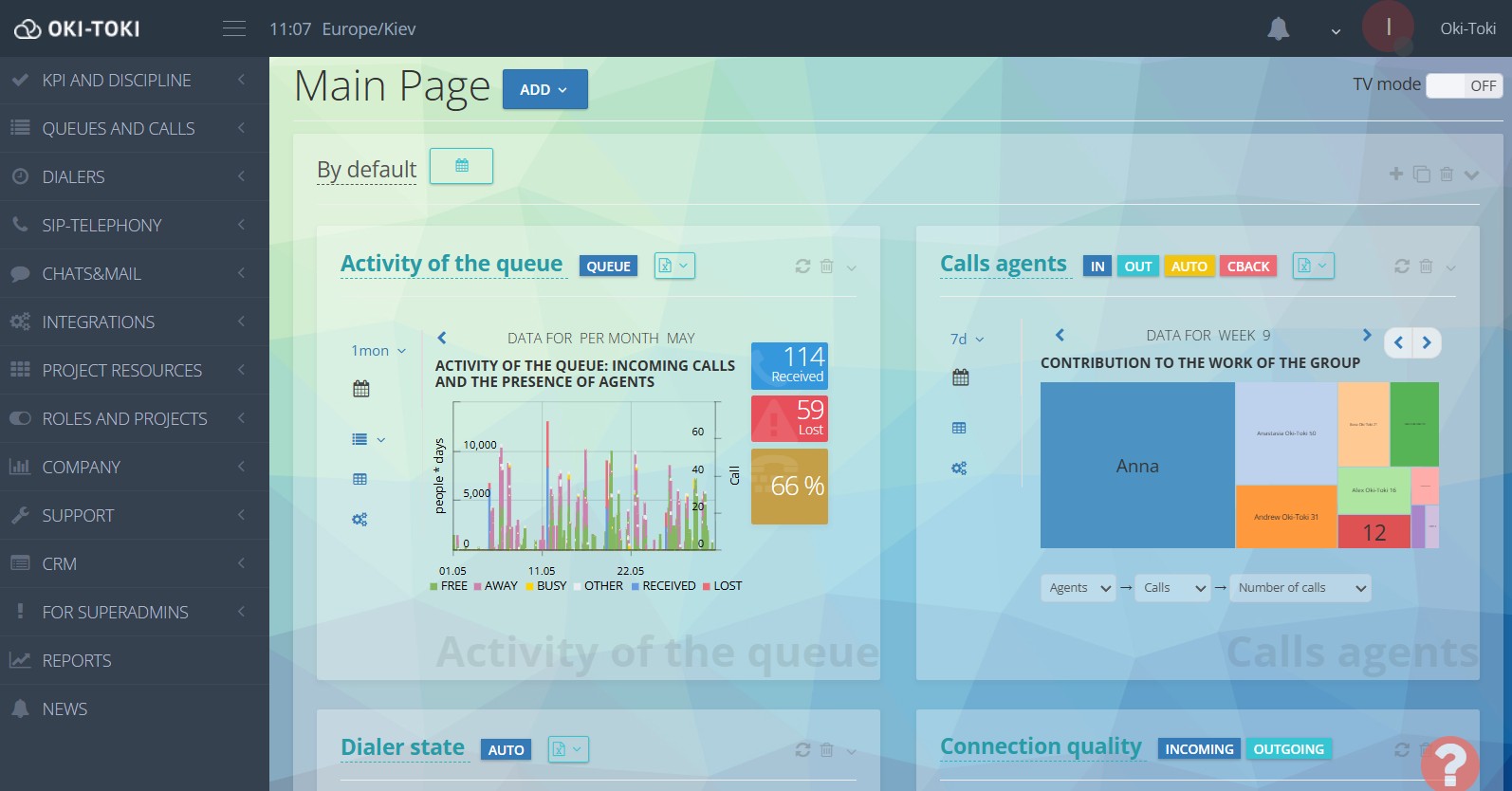
Charts, widgets, and diagrams for assessing the situation without viewing full reports. For example, the “Queue Activity” widget shows the number of inbound calls, waiting duration, and so on.
- Callback
A tool for handling missed calls. If a client didn’t get through to the hotline, their number is automatically added to the dialer’s callback list for a subsequent dial-out. Read more about Callback in a separate article. - Integration with CRM
Integration with many CRM systems, for example, Kommo CRM, LeadVertex, Zoho CRM, and others. - Auto-agent
A robot will answer calls instead of a live agent, giving the customer information or simply redirecting them to the appropriate manager. - Chats
Used for answering inbound applications in the form of messages. Oki-Toki Chats are suitable for processing customer messages in social networks, emails, on websites, and various messengers (WhatsApp, Telegram, Viber, Skype).
Reports and analytics
The Oki-Toki cloud service instantly generates real-time reports with all the important indicators for supervisors and managers. This way, you can track the wait time for a free agent, missed calls (accidental or deliberate), agent performance ratings, and much more.
Oki-Toki has more than 30 free reports that will easily help you understand indicators, agents’ work, financial expenses, etc. You can read about all of this in detail in the article “How to generate reports in a call center”.
Here are a few Oki-Toki reports that will be useful when analyzing inbound calls:
- “Call Journal” – a detailed report on inbound, outgoing calls, and dialer calls for a specified period. It contains everything necessary: phone numbers, agent names, SIP responses, wait time and talk time. Also, detailed information about script functions, providers (SIP-gateways), as well as call recording, transcript, etc.
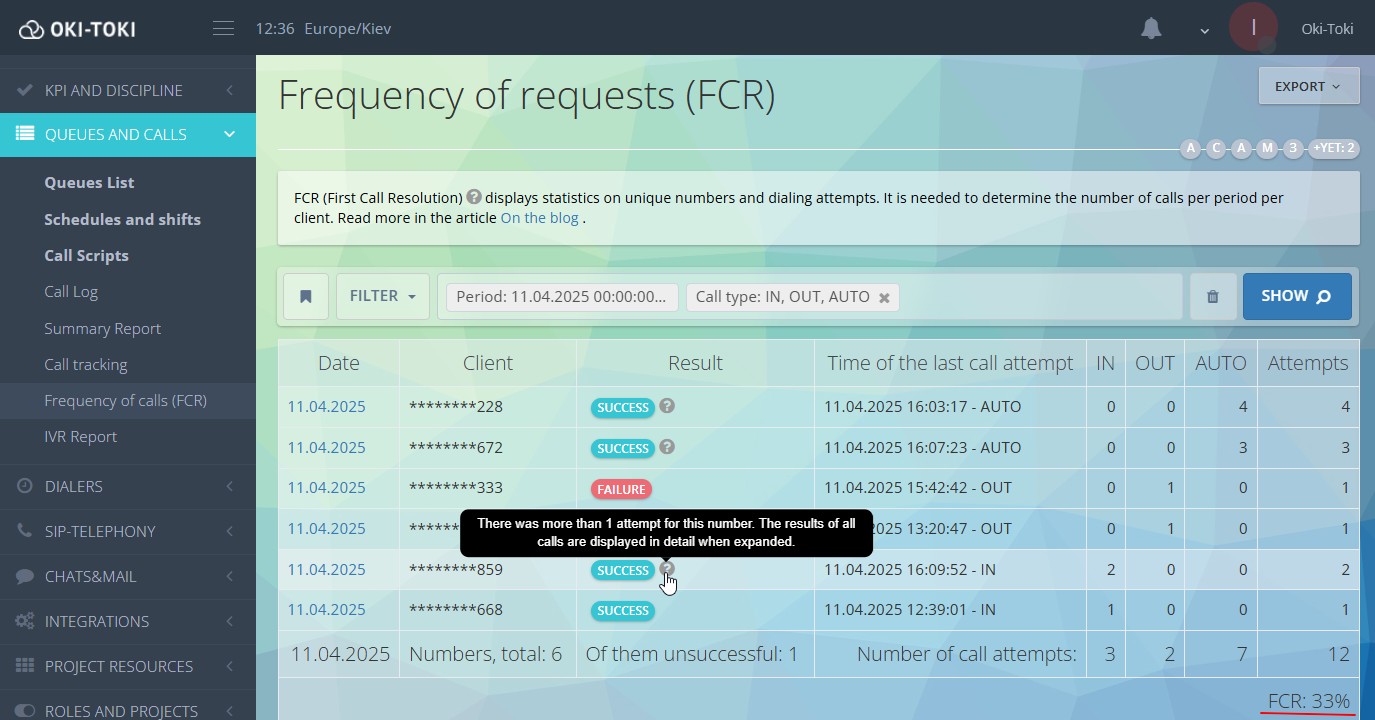
- “FCR Report” – focuses on the number of call inquiries solved on the first attempt. Useful for call centers tracking the First Call Resolution (FCR) metric.
- “Summary Report” – general data on calls: their number, wait/talk duration with data grouped by agents, queues, outcomes, and other important parameters.
- “Inbound Statistics” – summarized data on inbound calls, where columns will show the total duration (DUR), average call duration (ACD), and the percentage of successful calls (ASR).
- “Call tracking” – statistics on unique subscriber numbers. That is, this report tracks each new client, attempts to reach the line, and wait/talk duration for inbound inquiries.
- “Reports” – instant reports for managers and clients, which regularly arrive via email.
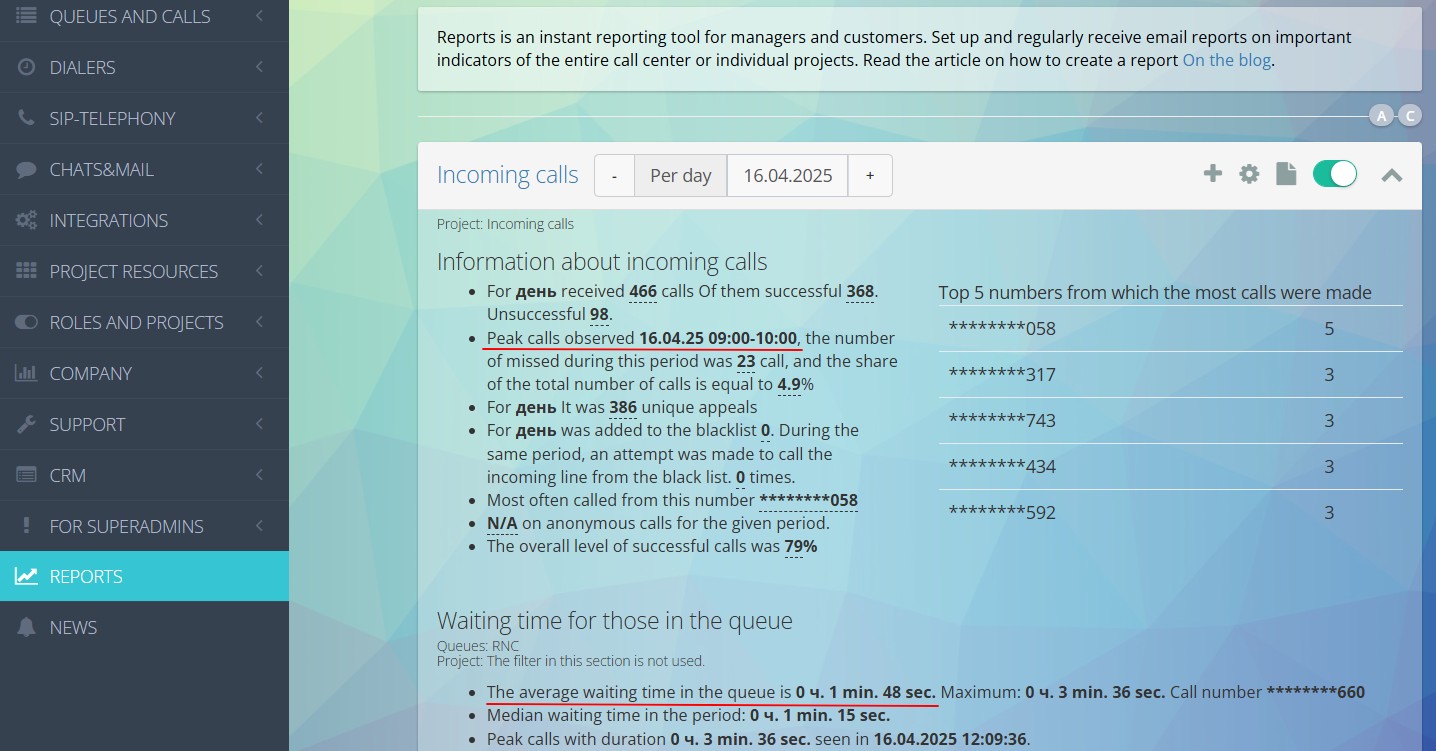
These reports will help you understand how your agents work on the inbound line, whether business processes are correctly set up, as well as help you quickly notice and promptly eliminate problems. For instance, adjusting the number of agents, changing texts for voice assistants, adjusting dialer scripts, or other settings.
A hotline is more than just receiving calls. It’s a complex process that must be organized at the highest level. Cloud-based call centers offer many excellent opportunities for improving communication with customers.
Availability, flexibility, scalability, automation, and analytics — all these factors will enhance the quality of your call center and increase customer loyalty. With Oki-Toki, you will easily set up all scenarios, manage all processes, and be confident that your customers will receive the best service.